G
Guest

إتقان التدفق النقدي لمشروع الإنشاءات باستخدام CASHFLOWPOT

تعرف على كيفية تحسين التدفق النقدي لمشروعك الإنشائي باستخدام CASHFLOWPOT عبر هذا الشرح العملي السهل، مع التصدير إلى Excel للتحليل.

إتقان التدفق النقدي لمشروع الإنشاءات باستخدام CASHFLOWPOT
Arabic version

شرح التدفق النقدي لمشروع الإنشاءات

في هذا الشرح، سأرشدك إلى كيفية استخدام CASHFLOWPOT لإنشاء تدفق نقدي لمشروع إنشائي.

إنشاء مشروع جديد

لإنشاء مشروع، انقر على علامة الزائد بجوار الوسم "New Project". في النموذج الذي يظهر، أدخل اسم المشروع، ويمكنك أيضًا إضافة وصف اختياريًا. ثم أدخل قيمة العقد. كما يمكنك عرض شروط العقد وتعديلها بالنقر على المفتاح أسفل حقل قيمة العقد—في هذا المثال، قمت بتحديث معدل الفائدة.

بعد الانتهاء، انقر على "Save." الآن تم إنشاء مشروعك، وحان الوقت لإضافة الأنشطة.

إضافة الأنشطة

لإنشاء النشاط الأول، انقر على علامة الزائد في منتصف الشاشة. املأ النموذج بالتفاصيل مثل اسم النشاط، النوع، المدة، تاريخ البدء، والتكلفة.

لإضافة نشاط آخر، انقر على علامة الزائد في أسفل منتصف الشاشة. املأ تفاصيل النشاط، وإذا لزم الأمر، اعرض وعدّل شروط الباطن بالنقر على "Show conditions of subcontract." هنا يمكنك تعديل نسبة الباطن والمتغيرات الأخرى ذات الصلة.

عرض وتصدير التدفق النقدي

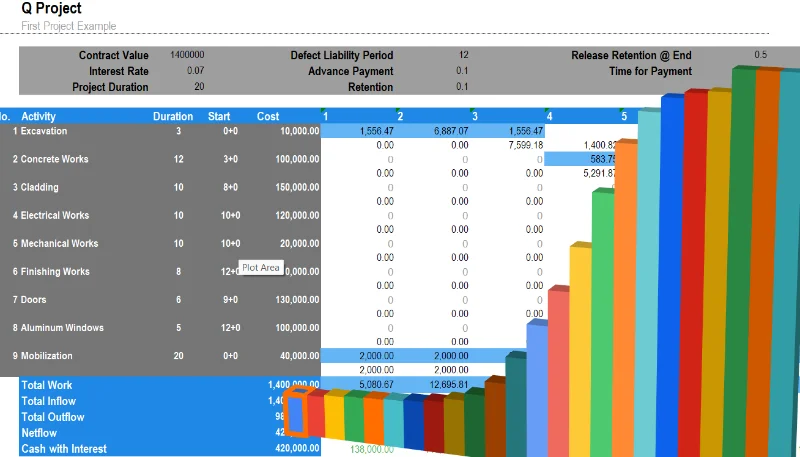
بعد الانتهاء من إضافة الأنشطة، يمكنك عرض التدفق النقدي بسحب النموذج السفلي القابل للسحب إلى أعلى في أسفل الشاشة. سيؤدي ذلك إلى إظهار كل من التدفق النقدي للنشاط والمخططات المرتبطة به. كما يمكنك تصدير التدفق النقدي إلى Excel بالنقر على زر التنزيل في أسفل الشاشة.

يتضمن ملف Excel المصدّر كلًا من التدفق النقدي للنشاط والتدفق النقدي الإجمالي للمشروع.


انقر هنا لاستخدام التطبيق مجانًا

اطلع هنا على كيفية مصدر حساب التدفق النقدي والفائدة المركبة


Leila Haddad's photo
Leila Haddad
@TransitLeila
Jun 15, 2026
0
40
632
452

Related Checklists


Mass Concrete Placement Inspection Checklist
✅ 13 items
Mass concrete placement involves the careful pouring and setting of large concrete volumes where heat generation and temperature control are critical factors. This inspection covers all processes from pre-placement preparations to post-placement monitoring, ensuring structural integrity and safety. By following this checklist, construction teams can effectively manage the thermal properties of mass concrete, preventing thermal cracking and ensuring quality. With interactive features, users can tick items, leave comments, and export the completed checklist in PDF or Excel, secured with a QR code.
Smart Building Technology Integration Inspection Checklist
✅ 12 items
Smart building technology integration involves the seamless incorporation of intelligent systems into building infrastructures to enhance efficiency, security, and occupant comfort. This inspection checklist covers critical aspects including sensor deployment, network integration, and system interoperability. By focusing on these areas, stakeholders can ensure optimal functionality and avoid costly disruptions. This interactive checklist allows users to tick items, add comments, and export finalized reports as PDF or Excel, complete with a QR code for authenticity.
Compressed Air System Inspection Checklist
✅ 12 items
Compressed air systems are critical components in many industrial facilities, providing power to various tools and machinery. This checklist guides the inspection of these systems, covering components like compressors, dryers, and piping. A thorough inspection ensures efficiency, safety, and longevity of the system, preventing costly downtimes and accidents. Users can interact with this checklist online by ticking off tasks, leaving comments, and exporting completed reports as PDF or Excel, authenticated with a QR code for traceability.
BMS Integration Inspection Checklist for HVAC, Lighting, and Security
✅ 12 items
Building Management System (BMS) integration is crucial for optimizing the functionality and efficiency of HVAC, lighting, and security systems in modern buildings. This inspection checklist ensures that all integrated systems are operating synergistically, providing seamless control and monitoring. Proper integration minimizes energy consumption, enhances security, and improves occupant comfort. This interactive checklist allows users to tick items, comment, and export the completed report as PDF or Excel, complete with a QR code for authenticity.
Communications Cabling and Device Installation Inspection Checklist
✅ 17 items
Inspecting communications cabling and device installation involves a thorough evaluation of the components and connections within a telecommunications network. This process includes verifying cable pathways, assessing physical installations, and ensuring compliance with industry standards and safety regulations. Proper inspection helps prevent network failures, enhances performance, and ensures safety by identifying potential issues before they become serious problems. This checklist is interactive, allowing users to tick items, leave comments, and export reports as PDF or Excel, complete with a QR code for authenticity.

Related Articles


Quollnet Cashflow
⏳ 1 min read
كيفية استخدام Quollnet للتنبؤ بالتدفق النقدي لمشروع البناء
يقوم Quollnet بمحاكاة تقدم العمل في المشاريع الحقيقية لتوليد توقعات التدفق النقدي. أدخل تكلفة المشروع، الدفعة المقدمة، المدة، الاحتفاظ، والمزيد لتوقع التدفق النقدي الخاص بك.
Construction Tender Preparation Guide
⏳ 4 min read
دليل إعداد مناقصات البناء | عملية تقديم العطاءات خطوة بخطوة
تعلم عملية إعداد مناقصات البناء بالكامل - من تلقي الدعوات لتقديم العطاءات إلى تعبئة الفريق الاستراتيجية، والتحليل، والعروض الفائزة.
Construction Cashflow Prediction
⏳ 7 min read
التنبؤ بالتدفق النقدي لمشروع إنشائي
تعرف على كيفية التنبؤ بدقة بالتدفقات النقدية لمشاريع الإنشاء باستخدام نماذج رياضية مثل المنحنيات متعددة الحدود والأسية مع أهم التعديلات.
How To Create a Project Cash Flow For Contractors
⏳ 5 min read
تعلم كيفية إنشاء تدفق نقدي شامل لمشاريع البناء. تقديم Cashflowpot
تعلم كيفية إنشاء تدفق نقدي شامل لمشاريع البناء، بما في ذلك شروط العقد الرئيسية، احتجاز المقاولين الفرعيين، العمل الزائد عن الفواتير (WIEB)، الدفعات المقدمة، والتكاليف غير المباشرة. يساعد هذا الدليل خطوة بخطوة المقاولين على إدارة التدفقات النقدية للمشروع بكفاءة.
How To Create Your First Snag
⏳ 1 min read
كيفية إنشاء أول عيب لك في 4 خطوات سهلة
تقدم هذه المقالة دليلًا خطوة بخطوة حول كيفية إنشاء عيب جديد باستخدام Snag Here، وهو تطبيق ويب ومحمول لإدارة العيوب (عيوب البناء) في المشاريع. يغطي تسجيل الدخول، وإنشاء المشاريع، وإنشاء قوائم العيوب، واختيار الشركات، وأخيرًا إنشاء عيوب جديدة مع القدرة على إضافة صور.