Work Breakdown Structure (WBS): What It Is, What It Is Not, and How It Is Used
A Work Breakdown Structure (WBS) is a hierarchical breakdown of total project scope into smaller, manageable parts. It is mainly a scope and control structure, not the same as an activity code, cost code, BOQ, or material code. Although the idea sounds simple, WBS is often misunderstood in real projects because people use the term to refer to schedule groupings, trade breakdowns, budget structures, or ERP coding. This guide explains what a WBS really is, what it is not, how to create one, how it connects to planning and cost estimation, how it appears in master and detailed programmes, and why it should usually be linked to budget items rather than forced directly into ERP transactions.
Table of Contents
- What Is a Work Breakdown Structure (WBS)?
- Why WBS Matters in Project Management
- The 100% Rule in WBS
- Deliverable-Based vs Phase-Based WBS
- WBS Levels, Work Packages, and the Right Level of Detail
- The WBS Dictionary
- How to Create a WBS Step by Step
- How to Validate and Review a WBS
- WBS and Project Scheduling
- WBS and Cost Estimation
- WBS and Responsibility Assignment
- WBS vs Task Lists, Schedules, and BOQs
- WBS vs Activity Codes in Planning Software
- WBS vs Cost Codes, Budget Codes, and Material Codes
- Why Budget Items Are Often More Stable Than Programme WBS
- Linking Budget Items to WBS and Programme Activities
- Why Programme WBS Should Not Usually Become the ERP Budget Structure
- WBS in Master Programmes and Detailed Programmes
- WBS from the PMC Perspective
- WBS in Tender Programmes and Baseline Programmes
- Is WBS Contractual?
- WBS in Progress Reporting, Delay Analysis, and EOT
- Full Construction Example of WBS Development
- Tools and Software for Creating a WBS
- Using AI and Mermaid to Visualize a WBS
- Coming Soon: Free AI WBS Generator
- Common Mistakes When Creating a WBS
- Best Practices for Building a Useful WBS
- Conclusion
- FAQ
What Is a Work Breakdown Structure (WBS)?
A Work Breakdown Structure is a hierarchical decomposition of the total project scope into smaller parts until the work becomes manageable for planning, responsibility assignment, cost estimation, and control. The key idea is that the WBS is primarily about scope structure.
A good WBS answers questions such as:
- What are the major parts of the project?
- How is the total scope divided?
- What sits under each major branch?
- At what point does the structure become detailed enough to manage directly?
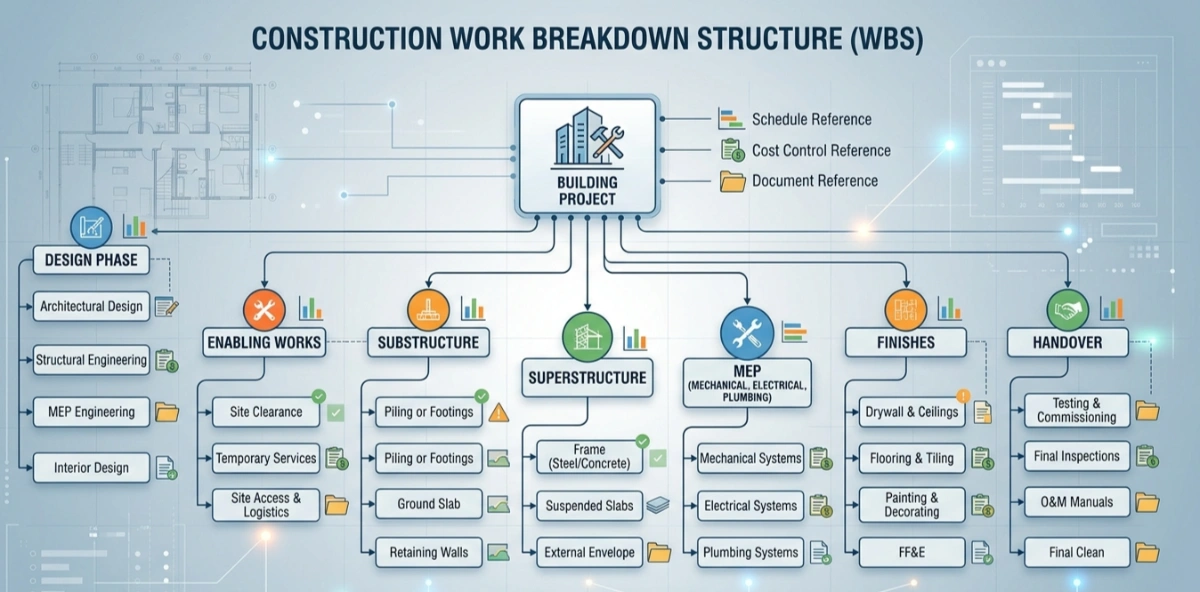
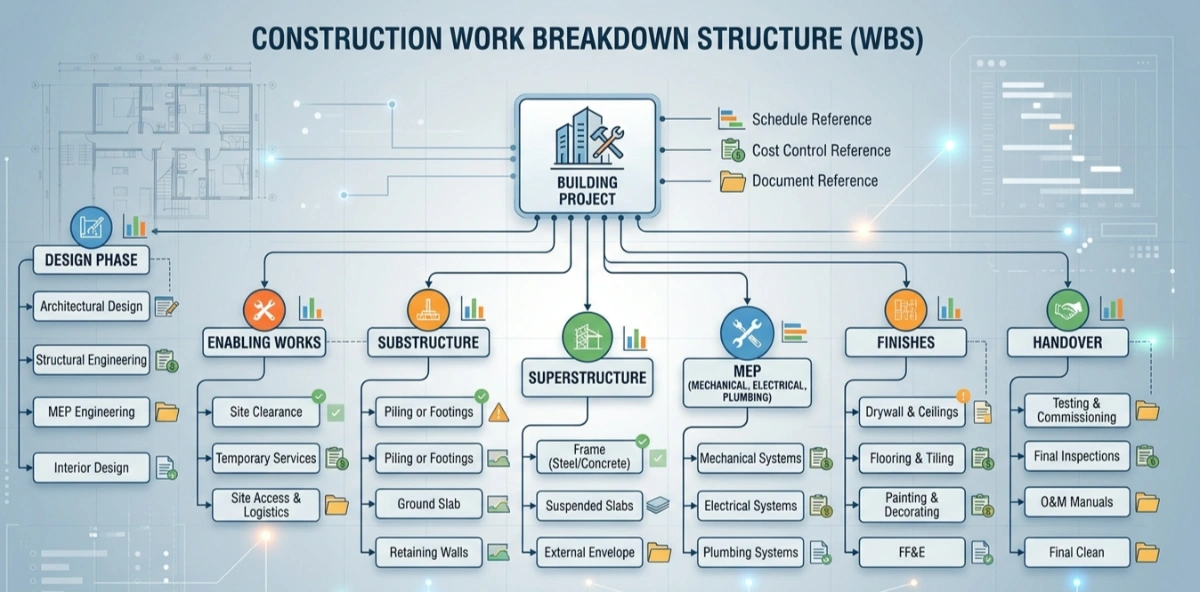
A simple construction example could begin like this:
- 1 Project
- 1.1 Design
- 1.2 Enabling Works
- 1.3 Substructure
- 1.4 Superstructure
- 1.5 MEP
- 1.6 Finishes
- 1.7 External Works
- 1.8 Handover
At this level, the structure is still broad. It tells the team how the project is organized at scope level. It does not yet represent all activities, procurement items, or ERP transactions.
Why WBS Matters in Project Management
WBS matters because it gives the project a structure that people can use consistently. It helps define scope clearly, avoids missing major work, supports planning, improves communication, and makes reporting more disciplined.
Without a good WBS, teams often face the same problems:
- scope is unclear
- packages overlap
- progress reporting becomes inconsistent
- cost planning and scheduling use different languages
- people disagree on what is included under each branch
In simple terms, WBS is one of the main foundations of structured project controls.
The 100% Rule in WBS
The 100% rule is one of the most important WBS principles. It means the WBS should capture 100% of the project scope required to deliver the project, including all deliverables and supporting work within the agreed boundaries.
The rule has two practical sides:
- the WBS should not miss major scope
- the WBS should not double-count or overlap scope
Correct coverage
If a building project includes design, enabling works, structure, MEP, finishes, testing, handover, and close-out support, then the WBS should capture those major branches in some rational form.
Incorrect coverage
If the WBS includes only structure and finishes but ignores permits, temporary works, testing, or handover support, it is incomplete. If a package appears partly under two different branches with no clear rule, the structure overlaps and becomes hard to control.
Common mistakes
- forgetting indirect or support scope
- mixing contractor scope and consultant scope without clear boundaries
- placing the same work under multiple branches
- using names that are too vague to test coverage
A strong WBS should be broad enough to represent the whole project and clear enough to show where each part belongs.
Deliverable-Based vs Phase-Based WBS
There is more than one valid way to structure a WBS. Two of the most common approaches are deliverable-based and phase-based.
Deliverable-based WBS
This breaks the project down by what is being delivered. For example:
- Substructure
- Superstructure
- MEP
- Finishes
- External Works
This is often stronger for scope definition because it reflects the physical or contractual output more directly.
Phase-based WBS
This breaks the project down by lifecycle stage. For example:
- Pre-Design
- Feasibility
- Design
- Tender
- Construction
- Handover
- DLP
This can work well at project level, especially from an owner or PMC perspective.
When to use each
- Use a deliverable-based WBS when scope definition and package control are the priority.
- Use a phase-based WBS when the project is being managed at lifecycle level or when the project is still at high-level master programme stage.
- Use a hybrid approach when the project naturally needs both views, such as a master programme by phase and a detailed construction branch by deliverable.
Pros and cons
- Deliverable-based WBS is usually stronger for execution, cost planning, and package definition.
- Phase-based WBS is often easier for executive reporting and lifecycle tracking.
- A poorly planned hybrid can become confusing if the decomposition logic changes randomly from one branch to another.
WBS Levels, Work Packages, and the Right Level of Detail
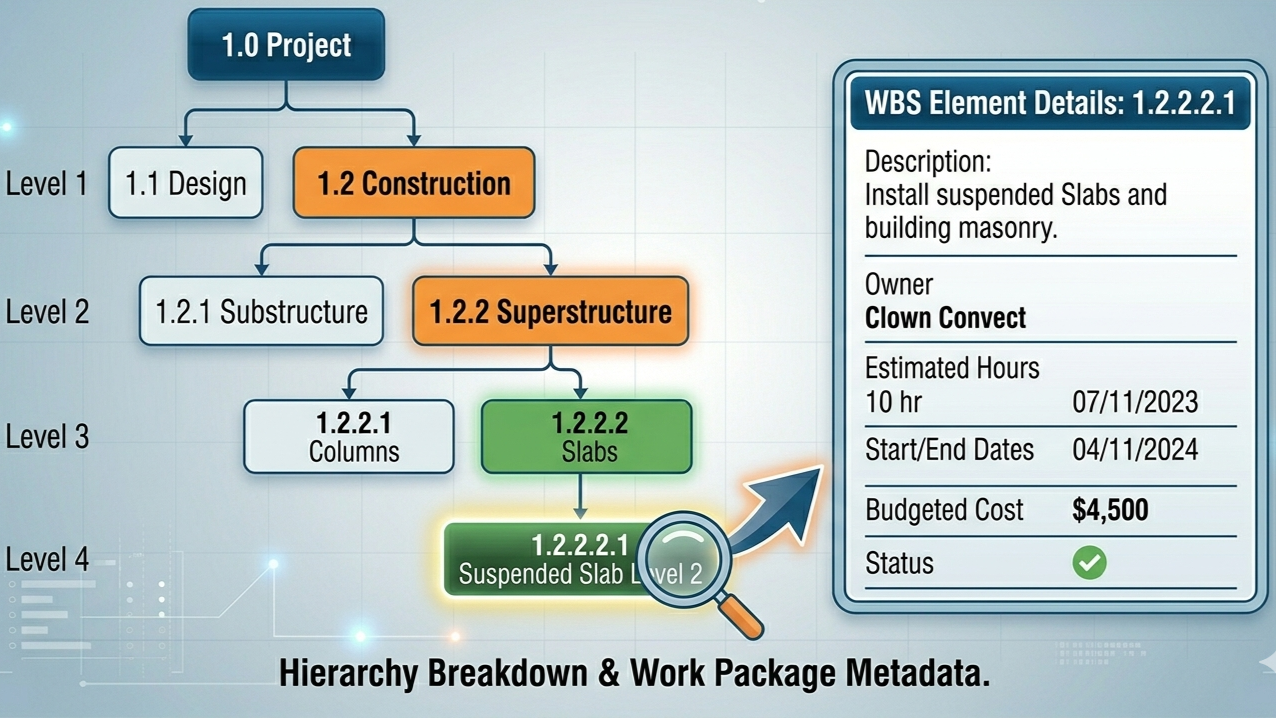
WBS levels are simply layers in the hierarchy. High levels are broad. Lower levels become more detailed.
A work package is the lowest practical level at which work is planned, assigned, estimated, monitored, and controlled. It is where the WBS becomes usable in daily project work.
What makes a good work package
- clear scope
- manageable size
- clear ownership
- estimable cost and effort
- traceable progress
How deep should a WBS go
A WBS should not be too shallow or too deep. If it is too shallow, the team cannot estimate or control it properly. If it is too deep, it becomes hard to maintain and starts to behave like a task list rather than a scope structure.
A practical stopping point is usually when a package is detailed enough to support:
- cost estimation
- scheduling
- responsibility assignment
- progress reporting
That level is often where the work package sits.
The WBS Dictionary
A WBS dictionary is the supporting reference that explains what each WBS element actually means. The code and title alone are rarely enough.
A typical WBS dictionary entry may include:
- WBS code
- title
- scope description
- included work
- excluded work
- constraints or assumptions
- responsible party
- remarks or acceptance notes
This is especially important in large projects where multiple disciplines, consultants, contractors, or packages interact. The dictionary prevents different people from assigning different meanings to the same WBS branch.
How to Create a WBS Step by Step
A practical method to create a WBS is:
- Define the project scope. Start with the agreed scope and boundaries.
- Choose the first breakdown logic. Decide whether the top level should be by phase, deliverable, building, area, discipline, or a hybrid.
- Identify the major branches. Create the highest-level elements that cover the whole project.
- Decompose each branch. Break each branch into smaller, meaningful components.
- Stop at work package level. Do not decompose endlessly.
- Assign codes. Apply a clear numbering system such as 1, 1.1, 1.1.1.
- Validate with the 100% rule. Confirm full coverage and no overlap.
- Prepare the dictionary. Add short definitions and scope notes.
- Review with stakeholders. Confirm that the structure is usable in practice.
Detailed interactive checklist: Step by step work breakdown structure - Generated by QChecklists
PDF Format for 27 detailed steps: 27 Steps to create a complete wbs
This process sounds simple, but it is where most real WBS problems start. The challenge is not drawing a tree. The challenge is choosing a decomposition logic that remains useful in planning, reporting, and control.
For a visual walkthrough of these levels, watch this 2-minute breakdown.
How to Validate and Review a WBS
A WBS should be reviewed before it becomes the basis for planning and reporting. Useful review questions include:
- Does it cover the full agreed scope?
- Does it follow a clear decomposition logic?
- Are the branches mutually clear and non-overlapping?
- Is the level of detail practical?
- Can cost, schedule, and responsibility be linked to it?
- Do the stakeholders interpret the branches the same way?
A good WBS often improves through iteration. It is normal to adjust it once the team tests it against planning, tendering, package definition, or progress reporting.
WBS and Project Scheduling
WBS and scheduling are closely related, but they are not the same thing.
The WBS structures the work. The schedule then turns that structure into time-based activities, sequences, durations, logic links, and dates.
In practice, work packages often become the bridge between WBS and schedule. A work package may generate one or more schedule activities, depending on how the planner chooses to model execution.
This is where schedule tools such as Gantt charts and CPM networks come in. The WBS helps define the logical scope container. The schedule adds execution logic.
A simple way to see the relationship is:
- WBS answers: what work exists and how it is structured
- schedule answers: when and in what sequence the work will happen
WBS and Cost Estimation
WBS also supports cost estimation. Once the project is broken into practical packages, the team can estimate labour, material, equipment, subcontract, and other cost components with more discipline.
One common method is bottom-up estimating:
- estimate at lower package level
- aggregate upward to parent WBS branches
- review totals at higher levels
This makes WBS useful for:
- preliminary estimating
- package pricing
- budget roll-ups
- cash flow logic support
However, that does not mean the WBS should always become the ERP budget structure. It means the WBS can help estimate and organize cost information.
WBS and Responsibility Assignment
A WBS becomes far more useful when it is connected to responsibility assignment.
This may happen through:
- an OBS, or Organizational Breakdown Structure
- a responsibility matrix
- a RACI matrix
- package ownership assignment
In simple terms, once a work package exists, someone should own it. The WBS gives the structure. The OBS or RACI gives accountability.
This is one of the ways WBS moves from theory to management practice.
WBS vs Task Lists, Schedules, and BOQs
These terms are often confused, but they are not the same.
WBS vs task list
A task list is usually a flat or loosely organized list of actions. A WBS is hierarchical and scope-based.
WBS vs schedule
A schedule contains activities, durations, dates, logic, calendars, and progress. A WBS is only one of the structures that may support the schedule.
WBS vs BOQ
A BOQ is a commercial and measurement document. It may align partly with WBS branches, but it is not automatically the same structure. BOQ logic is often driven by measured items, tendering practice, and commercial requirements rather than pure scope hierarchy.
Comparison Table:
| Document | Primary Focus | Organized By | Unit of Measure |
| WBS | Scope & Deliverables | Hierarchy/Systems | Work Packages |
| Schedule | Time & Sequence | Chronology | Activities/Days |
| BOQ | Cost & Quantity | Trades/Materials | Units (m2, m3, tons) |
| Org Chart | People & Authority | Roles/Reporting | Positions/Names |
WBS vs Activity Codes in Planning Software
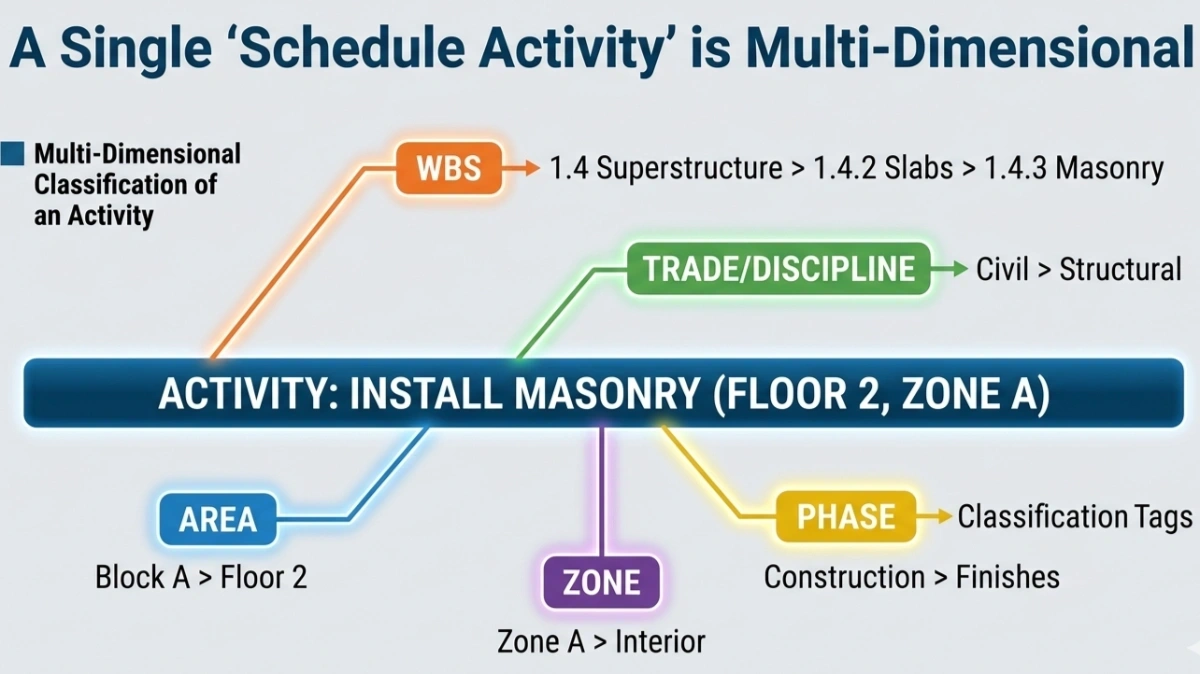
In planning software such as Primavera, activity codes are often used to group, sort, filter, and report activities by area, floor, phase, subcontractor, discipline, or zone.
That does not make them the same as the WBS.
A WBS is the main scope or programme hierarchy. An activity code is usually an attribute assigned to activities for flexible organization.
For example, an activity may sit under a WBS branch called Main Contractor Works > Finishes > Internal Walls and still carry separate activity codes for Block A, Level 2, Zone B, and Architectural.
Many planners use activity codes in a WBS-like way. That is practical, but conceptually they are different tools.
WBS vs Cost Codes, Budget Codes, and Material Codes
A WBS is mainly a scope structure. A cost code or budget code is mainly a financial classification. A material code identifies a specific item or material family for procurement or stock control.
For example:
- WBS: Main Contract Works > Masonry
- Budget code: Block A / Masonry
- Material code: Hollow Block 200 mm
These are related, but they serve different purposes. Confusion starts when one system is forced to perform the role of all the others.
Why Budget Items Are Often More Stable Than Programme WBS
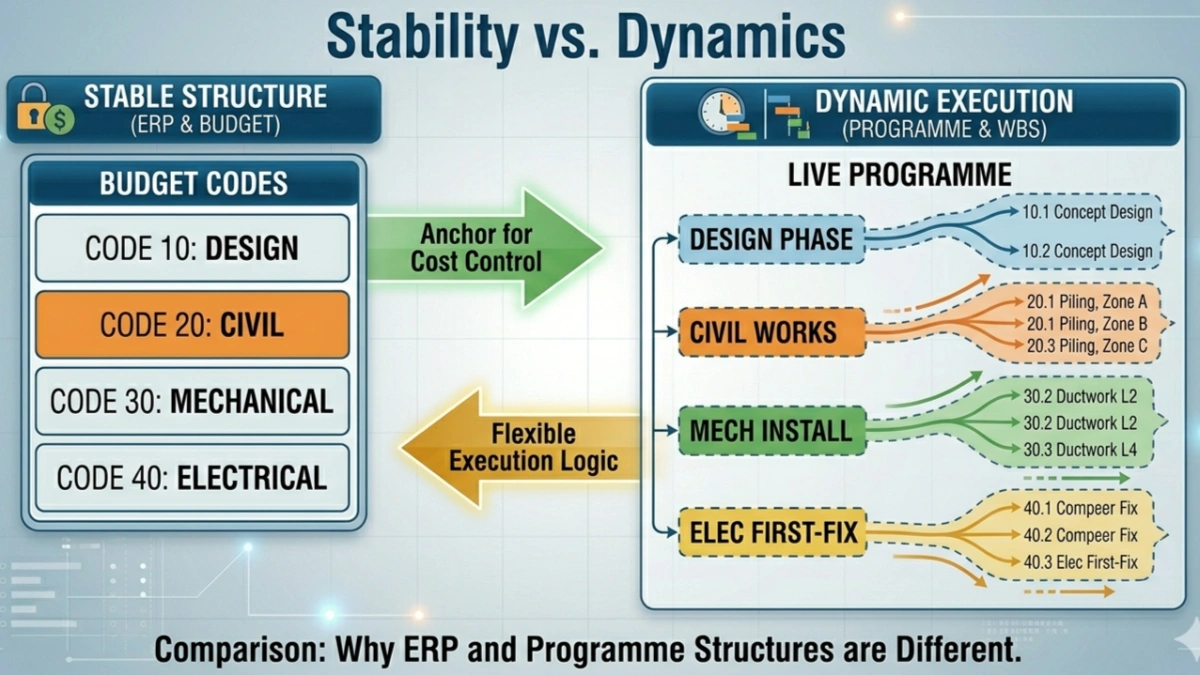
In real projects, the budget structure is usually more stable than the live programme structure.
The programme may change because of:
- zoning
- crew flow
- re-sequencing
- loading time
- delayed access
- recovery plans
The budget structure usually remains simpler and more stable, such as:
- cost center
- activity
- optional material code
This is why many project controls teams treat the budget item as the more stable financial anchor.
Linking Budget Items to WBS and Programme Activities
A strong practical model is to link the budget item to the WBS or programme, not the other way around.
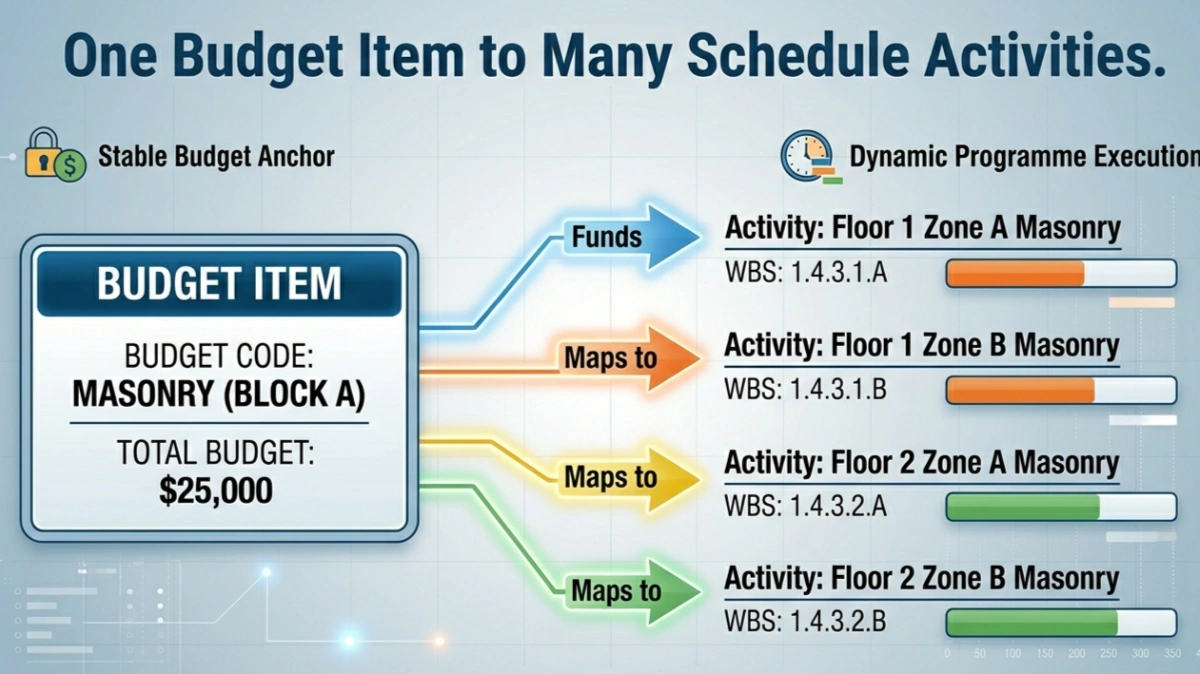
Example:
- Budget item: Block A / Masonry
- Linked schedule activities: Floor 1 Zone 1 Masonry, Floor 1 Zone 2 Masonry, Floor 2 Zone 1 Masonry, Floor 2 Zone 2 Masonry
This allows the ERP or cost-control system to remain stable while still giving the user visibility into the programme behind that budget line.
It is often a better model than trying to force the full live programme structure into the ERP budget structure.
Why Programme WBS Should Not Usually Become the ERP Budget Structure
This is one of the most important practical limits of WBS.
Live programme structures may include:
- floor
- zone
- team
- sequence
- resource loading logic
- temporary workfront release logic
That is useful for planning, but not practical as a direct ERP transaction structure.
Imagine ordering masonry blocks using a full execution-based WBS. A requisition could end up carrying fields such as block type, floor, zone, team, and sequence just to match the live programme logic. That is unrealistic for most procurement and store workflows.
ERP transactions usually work better with stable references such as:
- cost center
- activity or cost code
- material code
- quantity
- required date
- delivery location
This is why WBS is often better as a linked reference than as the primary ERP transaction code.
WBS in Master Programmes and Detailed Programmes
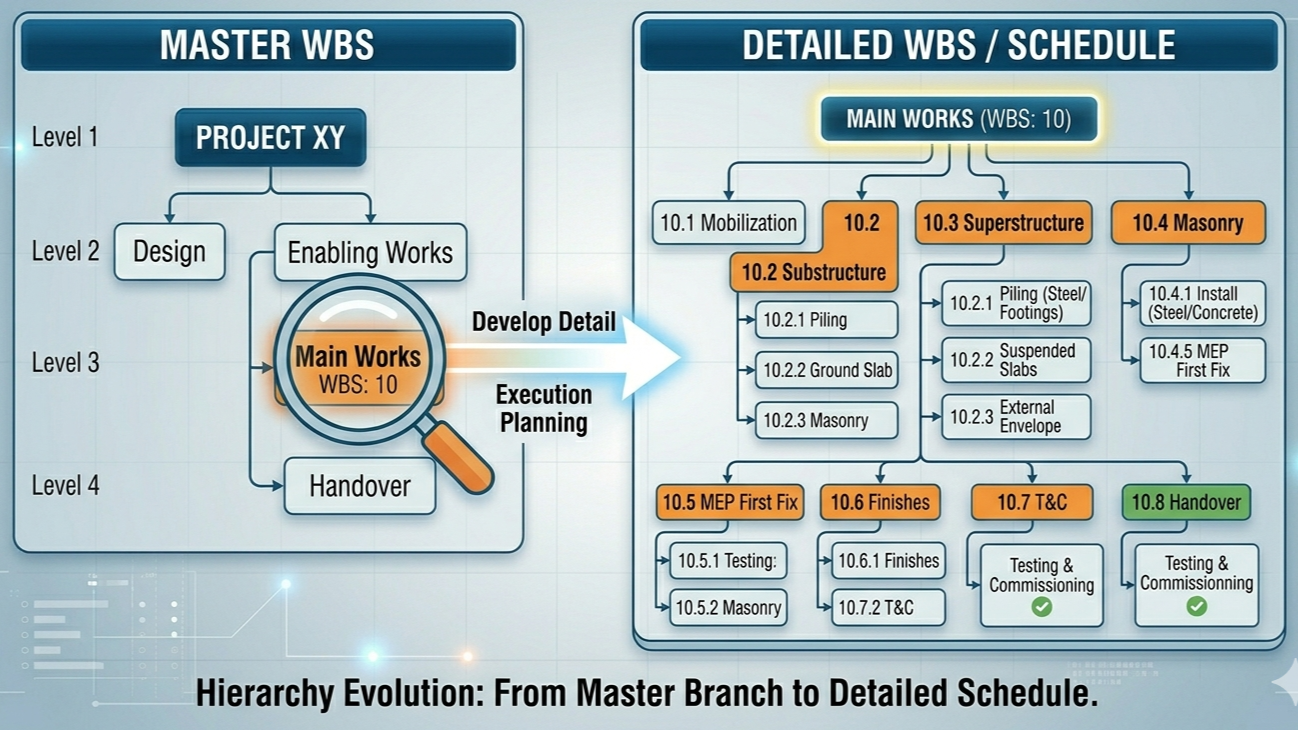
Projects often begin with a high-level master programme rather than a deep detailed construction programme. At this stage, the WBS may represent broad phases such as:
- Pre-Design
- Feasibility Study
- Design Phase 1
- Permits
- Enabling Works
- Main Tender
- Main Contractor Works
- Handover
- DLP
Later, each of these major branches can be expanded into more detailed planning structures. This is one of the reasons WBS can start at master level and later evolve into more detailed schedule branches.
WBS from the PMC Perspective
From a PMC perspective, WBS is often first used to structure the overall project lifecycle. The consultant may maintain a master programme with only major phases and decision points.
For example:
- 1 Pre-Design
- 2 Rough Estimate
- 3 Feasibility Study
- 4 Design
- 5 Permits and Enabling Works
- 6 Main Tender
- 7 Main Contractor Works
- 8 Handover
- 9 DLP
The contractor’s detailed planning can later develop under the relevant branch. This keeps continuity between strategic programme control and detailed execution planning.
WBS in Tender Programmes and Baseline Programmes
In many projects, the contractor submits a tender programme at bid stage. After award, a more detailed baseline programme is developed and submitted for review or approval.
Until that detailed programme is accepted, the tender or interim programme may be the operative schedule reference. Once the detailed baseline is approved, it usually becomes the main programme used for progress monitoring, delay analysis, and reporting.
In these cases, the WBS structure used in the programme becomes operationally important even if the contract itself does not discuss WBS as an independent legal concept.
Is WBS Contractual?
Usually, the WBS is not a standalone contractual concept in the same way as time for completion, milestones, liquidated damages, or payment terms.
However, it can become contractually relevant through the programme.
If the contract requires programme submissions, and the accepted programme is structured using WBS branches, then that WBS becomes part of the practical contractual scheduling framework. In correspondence and claims, parties may refer to the affected branch, but the real contractual force usually comes from the approved programme, milestones, and logic rather than from WBS theory itself.
WBS in Progress Reporting, Delay Analysis, and EOT
WBS is useful in progress reporting because it provides a stable reporting hierarchy. Reports can be organized by major branches, packages, systems, or phases.
In detaly analysis and EOT, the key references are usually:
- accepted programme
- affected activities
- logic links
- milestones
- critical or impacted path
- effect on completion
If these activities sit under a WBS branch such as Main Contractor Works or Finishes, that branch may still appear in the narrative and analysis.
Explore the different method of submitting an Extention Of Time.
- Time Impact Analysis (TIA)
- As-Planned vs. As-Built
- Impacted As-Planned
- Collapsed As-Built (But-For Analysis)
- Windows Analysis
Full Construction Example of WBS Development
Below is a practical example of how a WBS may develop from a master structure into a more detailed construction structure.
Master level
- 1 Pre-Design
- 2 Feasibility Study
- 3 Design
- 4 Permits and Enabling Works
- 5 Main Contract Works
- 6 Handover
- 7 DLP
Expanded main contract branch
- 5 Main Contract Works
- 5.1 Mobilization
- 5.2 Substructure
- 5.3 Superstructure
- 5.4 Masonry
- 5.5 MEP First Fix
- 5.6 Finishes
- 5.7 Testing and Commissioning
- 5.8 Handover Support
Expanded masonry branch
- 5.4 Masonry
- 5.4.1 Internal Blockwork
- 5.4.2 Shaft Walls
- 5.4.3 External Masonry
- 5.4.4 Masonry Close-Outs
At this point, the WBS is still scope-oriented. The planner may later convert parts of it into detailed execution activities by floor, zone, and sequence, but that detailed schedule logic is no longer the same thing as the pure WBS.
Tools and Software for Creating a WBS
WBS can be created in different tools depending on project complexity.
- Excel: good for quick drafting, coding, dictionaries, and simple templates
- Microsoft Project: useful when WBS is being developed close to the schedule
- Primavera P6: common for large construction schedules and formal programme structures
- Mind mapping or Brainstrom Tool useful for workshops and early brainstorming
- ERP or cost-control systems: useful mainly when WBS is linked to reporting or package structures
The best tool depends on whether the goal is drafting, scheduling, budgeting, reporting, or coordination.
Using AI and Mermaid to Visualize a WBS
AI is well suited to generating an early WBS draft because the first challenge is usually building a sensible structure quickly. Mermaid is useful because it is text-based, easy for AI to generate, and easy to render in lightweight web-based tools.
A simple Mermaid example looks like this:
flowchart TD
A["1 Project"]
A --> B["1.1 Design"]
A --> C["1.2 Enabling Works"]
A --> D["1.3 Substructure"]
A --> E["1.4 Superstructure"]
E --> E1["1.4.1 Columns"]
E --> E2["1.4.2 Slabs"]
E --> E3["1.4.3 Stairs"]
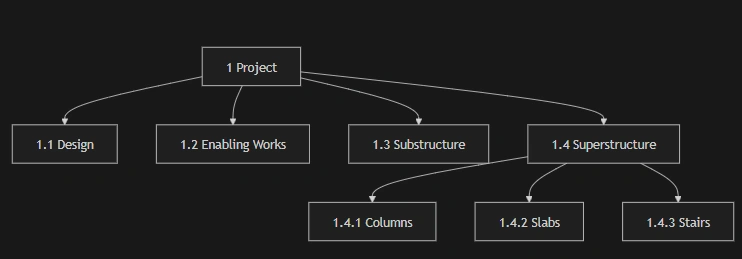
This image is not the exact code above, so try it on https://mermaid.live/edit
For small and medium WBS diagrams, this is often enough to generate a useful visual quickly.
Coming Soon: Free AI WBS Generator
We are preparing a lightweight AI WBS tool that will let users:
- enter a short project prompt
- generate a draft WBS
- get Mermaid code instantly
- preview the chart
- return later to previous generated runs
The first release will focus on speed and usefulness. Later versions may include branch expansion, WBS dictionary generation, better export features, and richer editing options.
Common Mistakes When Creating a WBS
- mixing deliverables and activities without clear logic
- ignoring the 100% rule
- over-decomposing the structure into task noise
- under-decomposing it so it cannot support estimation or planning
- using vague labels
- assuming BOQ, schedule, cost code, and WBS are all the same thing
- forcing live zoning and team logic into permanent budget structures
- not preparing a dictionary
Best Practices for Building a Useful WBS
- start from full project scope
- choose one clear decomposition logic at each level
- apply the 100% rule
- stop at practical work package level
- prepare a simple WBS dictionary
- test the WBS against schedule, estimating, and reporting needs
- keep financial coding and procurement coding separate where needed
- link systems instead of forcing them into one code
A useful WBS is not the one with the most branches. It is the one that helps the project team make better decisions and maintain consistency across planning and control.
Conclusion
A Work Breakdown Structure is mainly a scope structure. It helps teams define, organize, estimate, plan, and control project work. It is not automatically the same as a task list, a schedule, an activity code, a BOQ, a cost code, or a material code, even though those systems may interact closely in practice.
For construction and project controls, WBS becomes most useful when it is clear, hierarchical, validated, and supported by a dictionary. It is strong for scope definition, package planning, reporting, and programme structure. It is much weaker when forced to behave like a live ERP transaction code or a full execution logic model. In real projects, the best results often come when WBS, schedule, budget, and material coding are linked intelligently rather than merged carelessly.
REFERENCES
- Project Management Institute – Practice Standard for Work Breakdown Structures: pmi.org
- NASA – Work Breakdown Structure Handbook: PDF Download
- WBDG – Baseline Project Schedule Review Checklist: www.wbdg.org
- WBDG – Monthly Update Schedule Review Checklist: www.wbdg.org
- RICS – Extensions of Time, 1st edition: www.rics.org