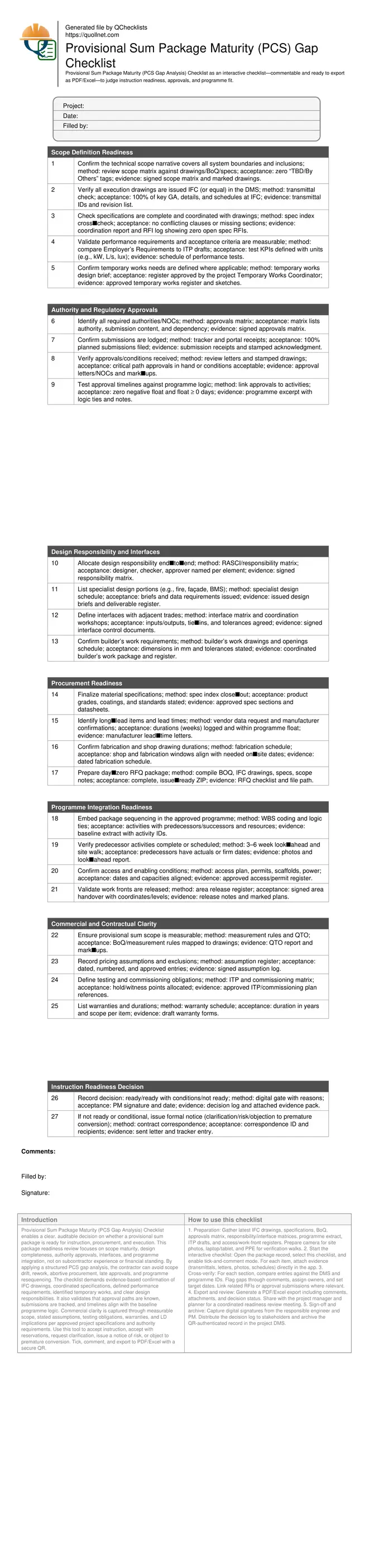
Provisional Sum Package Maturity (PCS Gap Analysis) Checklist
Definition: Provisional Sum Package Maturity (PCS Gap Analysis) Checklist helps contractors judge if a provisional sum package is defined enough for instruction, procurement, and execution without assessing subcontractor capability.
- Confirms scope, drawings, and specifications are complete and coherent
- Verifies approvals, interfaces, and programme logic align with execution
- Locks commercial assumptions, testing, warranties, and LD implications
- Interactive, commentable, export options with QR code for audit integrity
Provisional Sum Package Maturity (PCS Gap Analysis) Checklist enables a clear, auditable decision on whether a provisional sum package is ready for instruction, procurement, and execution. This package readiness review focuses on scope maturity, design completeness, authority approvals, interfaces, and programme integration, not on subcontractor experience or financial standing. By applying a structured PCS gap analysis, the contractor can avoid scope drift, rework, abortive procurement, late approvals, and programme resequencing. The checklist demands evidence-based confirmation of IFC drawings, coordinated specifications, defined performance requirements, identified temporary works, and clear design responsibilities. It also validates that approval paths are known, submissions are tracked, and timelines align with the baseline programme logic. Commercial clarity is captured through measurable scope, stated assumptions, testing obligations, warranties, and LD implications per approved project specifications and authority requirements. Use this tool to accept instruction, accept with reservations, request clarification, issue a notice of risk, or object to premature conversion. Tick, comment, and export to PDF/Excel with a secure QR.
- Drive evidence-based instruction decisions by verifying technical scope, IFC drawings, coordinated specifications, and performance requirements, while ensuring temporary works and builder’s work are explicitly defined and supported by signed matrices, schedules, and transmittals suitable for immediate execution.
- Reduce approval and interface risks by confirming authority pathways, submission receipts, conditional approvals, and programme-compatible timelines, alongside signed responsibility and interface matrices, builder’s work drawings, and commissioning roles linked to ITPs and hold/witness points for smooth handovers.
- Align procurement and programme by finalising material specifications, identifying long-lead items and fabrication durations, and preparing day‑zero RFQ packages. Validate sequencing, access, and work-front releases so execution can start without negative float or disruptive resequencing of adjacent trades.
- Interactive online checklist with tick, comment, and export features secured by QR code. Attach stamped approvals, photos, ITPs, and schedules; then issue a digitally signed decision log to accept, accept with conditions, request clarification, raise risk, or object to premature conversion.
Scope Definition Readiness
Authority and Regulatory Approvals
Design Responsibility and Interfaces
Procurement Readiness
Programme Integration Readiness
Commercial and Contractual Clarity
Instruction Readiness Decision
Make scope execution-ready with coordinated design and evidence
A mature provisional sum package starts with a watertight scope: complete IFC drawings, coordinated specifications, and measurable performance criteria. Use a scope matrix to reconcile drawings, BoQ, and narrative so inclusions, boundaries, and builder’s work are visible and unambiguous. Tag and eliminate “TBD” items early through RFIs, then align acceptance tests with ITP drafts using clear SI units (e.g., kW, L/s, lux, N·m). Temporary works, when applicable, should have a defined design brief and approval by the Temporary Works Coordinator, preventing ad‑hoc solutions that stall site activities. Capture all checks as auditable artifacts: transmittal IDs, coordination reports, RFI logs, and signed matrices. A practical cue that scope is truly execution‑ready is when the builder’s work drawings display dimensions and tolerances in millimetres and the performance test schedule already maps to inspection lots. This completeness enables day‑zero RFQs, accurate measurement, and clean handovers into procurement and planning without scope drift.
- Zero “TBD/By Others” tags remain in the scope set
- All key drawings are IFC with traceable transmittals
- Specifications align with drawings without contradictions
- Performance tests list units, methods, and witnesses
De-risk approvals and interfaces before committing the programme
Authority pathways, submission content, and approval conditions must be explicit and time‑linked to programme activities. Build an approvals matrix showing who submits what, to whom, and when. Verify lodged submissions with portal receipts and track conditional approvals or NOCs that gate site work, particularly Civil Defense, municipality, and utilities. In parallel, define design responsibility end‑to‑end and publish an interface matrix stating inputs, outputs, tie‑ins, and tolerances for adjacent trades. Builder’s work should be frozen through coordinated drawings and openings schedules. Testing and commissioning obligations need early assignment within ITPs, specifying hold and witness points. A reliable readiness signal is when approval timelines produce zero negative float and all critical NOCs are either in hand or backed by accepted conditional measures that do not disrupt logic. Collect letters, stamped drawings, and signed matrices so the instruction decision is supported by verifiable evidence rather than verbal assurances.
- Approvals matrix lists dependencies and timelines
- Conditional approvals are documented and acceptable
- Interfaces defined with tolerances and responsibilities
- ITPs allocate hold and witness responsibilities
Align procurement and sequencing for a clean instruction decision
Procurement readiness means materials and long‑lead components can be ordered immediately upon instruction. Confirm product grades, finishes, and standards in specifications; obtain manufacturer lead‑time confirmations in weeks; and prepare day‑zero RFQ packs including BOQ, IFC drawings, and scope notes. Check fabrication and shop drawing durations against required on‑site dates to avoid schedule compression. Programme integration is proven when the baseline shows linked activities with clear predecessors, area releases, access and permits, and no negative float if the package starts. Validate work fronts through signed release notes and site photos. Complete commercial clarity by documenting measurement rules, pricing assumptions, warranties, and any LD implications per approved project specifications and authority requirements. When all evidence aligns, issue a signed decision: accept, accept with conditions, request clarifications, raise a notice of risk, or object to premature conversion until gaps are closed.
- RFQ pack is complete and issue‑ready
- Long‑lead durations fit available float
- Work fronts and access are released
- Measurement rules map to drawings
- Decision is signed with evidence
How to use this PCS Gap Analysis checklist effectively
- Preparation: Gather latest IFC drawings, specifications, BoQ, approvals matrix, responsibility/interface matrices, programme extract, ITP drafts, and access/work-front registers. Prepare camera for site photos, laptop/tablet, and PPE for verification walks.
- Start the interactive checklist: Open the package record, select this checklist, and enable tick-and-comment mode. For each item, attach evidence (transmittals, letters, photos, schedules) directly in the app.
- Cross-verify: For each section, compare entries against the DMS and programme IDs. Flag gaps through comments, assign owners, and set target dates. Link related RFIs or approval submissions where relevant.
- Export and review: Generate a PDF/Excel export including comments, attachments, and decision status. Share with the project manager and planner for a coordinated readiness review meeting.
- Sign-off and archive: Capture digital signatures from the responsible engineer and PM. Distribute the decision log to stakeholders and archive the QR-authenticated record in the project DMS.
Call to Action
- Start Checklist Tick off tasks, leave comments on items or the whole form, and export your completed report to PDF or Excel—with a built-in QR code for authenticity.
- Download Excel - Provisional Sum Package Maturity (PCS Gap Analysis)
- Download PDF - Provisional Sum Package Maturity (PCS Gap Analysis)
- View Image - Provisional Sum Package Maturity (PCS Gap Analysis)
Cite & Embed
“Provisional Sum Package Maturity (PCS Gap Analysis) by Quollnet”
with a link to
this source page.
FAQ
Question: What makes a provisional sum package “ready for instruction”?
Question: How should we proceed if key authority approvals are still pending?
Question: Does this checklist replace subcontractor evaluation or prequalification?
Question: What evidence should we attach to support the decision?
Related Articles
Broader reading and guidance connected to this checklist topic.
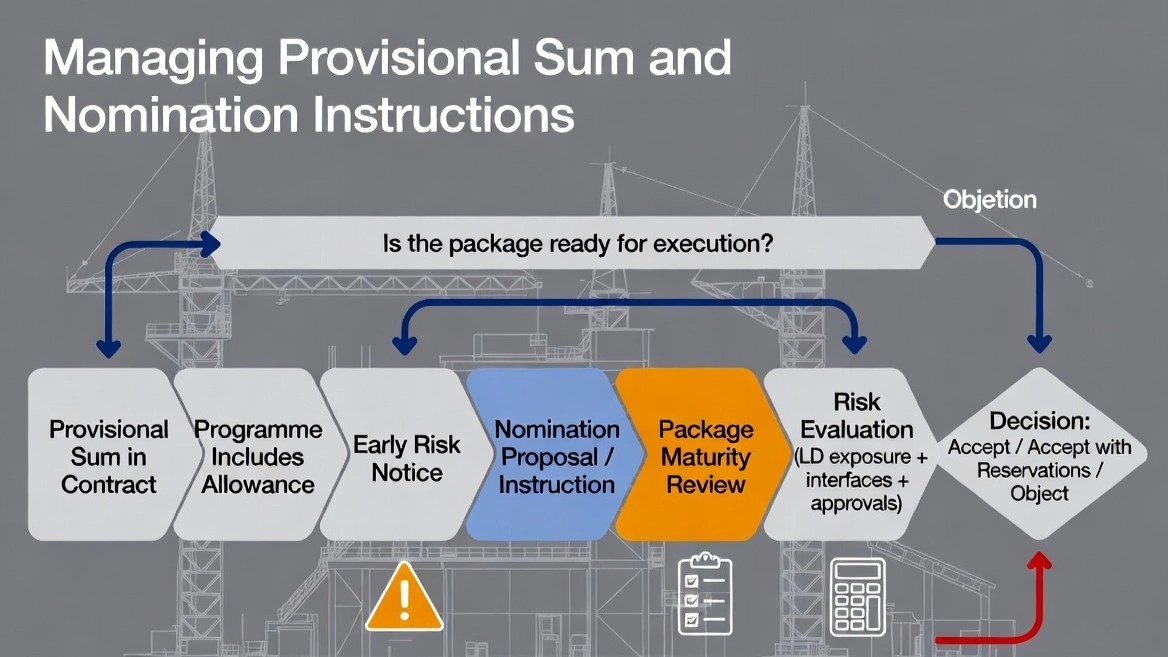

Fidic Site Instruction Form – Free Download And Usage Tips

Rfq Vs Rfp Vs Tender In Construction Procurement: Key Differences Explained

Site Clarifications (rfis) — Definition, Legal & Free Templates

Related Checklists
Keep the workflow moving with nearby templates chosen from similar checklist content.