G
Guest

سجل توضيحات الموقع (سجل RFI) — قالب Excel مجاني

حمّل سجل توضيحات الموقع (RFI) مجانًا بصيغتي Excel/CSV. تتبّع المعرفات، تواريخ الاستحقاق، الحالة، الردود، وروابط VO. دليل مختصر وإصدار احترافي مرفقان.

سجل توضيحات الموقع (سجل RFI) — قالب Excel مجاني
Arabic version

سجل توضيحات الموقع (سجل RFI) — قالب Excel مجاني وطريقة الاستخدام

مقتطف مميز:

يسجّل سجل توضيحات الموقع (ويُسمّى أيضًا سجل RFI، أو سجل RIF أو سجل استفسارات الموقع) كل توضيح من مرحلة الإصدار → الرد → الإغلاق، مع تواريخ الاستحقاق والنتائج (تم التوضيح، تعليمات، تغيير). استخدمه لمتابعة الردود، ومنع التأخيرات، والحفاظ على سجل تدقيقي لمطالبات تمديد الوقت/التكلفة.

ملاحظة مصطلحية: هنا تعني RFI = Request for Information (توضيح الموقع). بعض المناطق تستخدم RFI بمعنى Request for Inspection (WIR/IR/ITR)—وهذه عملية مختلفة تركز على التفتيش. اطّلع على طلب التفتيش هنا


تنزيلات مجانية
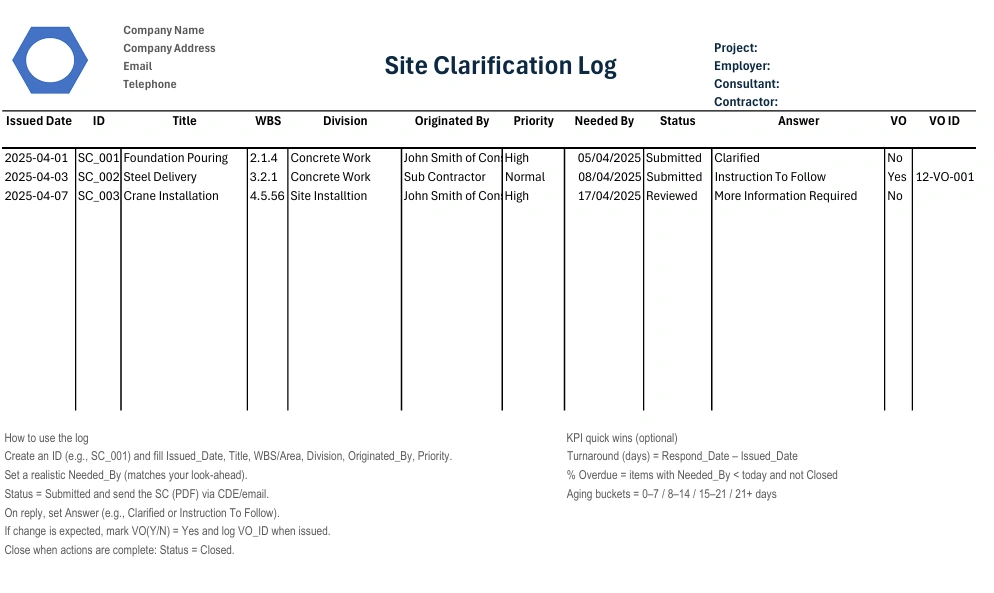
سجل توضيحات الموقع quollnet rfi

كيفية استخدام السجل (بسرعة)

  1. أنشئ معرّفًا (مثل SC_001) واملأ Issued_Date، Title، WBS/Area، Division، Originated_By، Priority.

  2. حدّد Needed_By واقعيًا (بما يتوافق مع خطة المتابعة).

  3. Status = Submitted ثم أرسل SC (PDF) عبر CDE/البريد الإلكتروني.

  4. عند الرد، حدّد Answer (مثل Clarified أو Instruction To Follow).

  5. إذا كان التغيير متوقعًا، فاجعل VO(Y/N) = Yes وسجّل VO_ID عند الإصدار.

  6. أغلقه عند اكتمال الإجراءات: Status = Closed.


مكاسب سريعة لمؤشرات الأداء (اختياري)

  • Turnaround (days) = Respond_Date – Issued_Date

  • % Overdue = البنود التي يكون فيها Needed_By < اليوم وليست Closed

  • Aging buckets = 0–7 / 8–14 / 15–21 / 21+ يومًا


Giovanni Rossi's photo
Giovanni Rossi
Jul 22, 2026
0
3
52
47

سجل توضيحات الموقع (سجل RFI) — قالب Excel مجاني

Frequently Asked Questions


FAQ

Q: ما هو سجل توضيحات الموقع (سجل RFI) ولماذا يُستخدم؟

A: هو سجل بسيط يتتبع كل توضيح من مرحلة الإصدار إلى الرد ثم الإغلاق، مع تاريخ الاستحقاق/‏SLA، والحالة، والرد، وأي رابط إلى أمر تغيير (VO). يساعدك على متابعة القرارات، وتجنب التأخيرات، والحفاظ على سجل تدقيقي لمطالبات تمديد الوقت/التكلفة.

FAQ

Q: ما الأعمدة التي يجب أن يتضمنها سجل توضيحات موقع أساسي؟

A: استخدم: Issued_Date، SC_ID، Title، WBS/Area، Division، Originated_By، Priority، Needed_By، Status، Answer، VO (Y/N)، VO_ID، Notes. هذا يغطي التعريف، وتاريخ الاستحقاق، ودورة الحياة، والنتيجة، والارتباط التجاري.

FAQ

Q: ما الفرق بين Status و Answer؟

A: Status هو دورة الحالة (Submitted، Reviewed، Answered، Closed). أما Answer فهو النتيجة (Clarified، Instruction To Follow، Further Information Required). إبقاؤهما منفصلين يجعل التقارير ولوحات المتابعة أدق.

FAQ

Q: كيف أحدد تاريخ Needed-By بشكل واقعي؟

A: اربطه بخطة المتابعة لمدة 2–3 أسابيع وبأزمنة التوريد للنشاط. كثير من الفرق تستهدف 3–10 أيام عمل حسب التعقيد والمخاطر.

FAQ

Q: متى يجب ضبط VO (Y/N) على “Yes” وتعبئة VO_ID؟

A: اجعل VO = Yes إذا كان الرد يشير إلى تغيير في الوقت أو التكلفة أو النطاق، وكان من المتوقع إصدار Variation/Change Order لاحقًا. أضف VO_ID بمجرد إصدار المستند التجاري (وأبقِ SC مفتوحًا حتى ذلك الحين).

FAQ

Q: هل يحل السجل محل الإشعارات التعاقدية الرسمية (مثل FIDIC/NEC/JCT)؟

A: لا، فالسجل أداة إدارية وليس إشعارًا قانونيًا. يجب عليك أيضًا اتباع إجراءات الإشعار والتعليمات المنصوص عليها في العقد (مثل FIDIC Red Book 2017 لأعمال الإنشاءات؛ وعمليات NEC4 ECC). neccontract.com

FAQ

Q: هل توجد RFIs/توضيحات الموقع بهذا الاسم في FIDIC؟

A: مصطلح “RFI” ليس تعريفًا واردًا في FIDIC. عادةً ما تتعلق التوضيحات بالتفسير أو الرسومات أو التعليمات، وأي تغيير يجب التعامل معه عبر تعليمات المهندس/التغييرات الرسمية وآلية المطالبات. راجع صفحات عقود FIDIC الرسمية ومعلومات Red Book. FIDIC

FAQ

Q: أين يمكنني قراءة المزيد عن عائلات عقود FIDIC؟

A: راجع النظرة العامة الرسمية لـ FIDIC ومتجر الكتب الخاص بها للاطلاع على Red/Yellow/Silver/Green Books والإرشادات. FIDIC

FAQ

Q: كيف يتوافق هذا مع NEC4 ECC؟

A: يركز NEC4 على التواصل الواضح والمقيد زمنيًا وإدارة التغيير عبر إجراءاته (مثل المراسلات وأحداث التعويض). يدعم سجلّك هذه العمليات، لكن الإشعارات الرسمية يجب أن تتبع قواعد NEC. neccontract.com

FAQ

Q: وماذا عن مستخدمي JCT؟

A: استخدم السجل لتتبع الاستفسارات التي قد تؤدي إلى تعليمات المعماري أو تغييرات. احرص دائمًا على مواءمة ذلك مع الإصدارات الحالية من JCT والإرشادات. jctltd.co.uk

FAQ

Q: هل يمكنني تشغيل السجل في Google Sheets بدلًا من Excel؟

A: نعم. استورد ملف CSV، وأضف قوائم التحقق من صحة البيانات (Status، Answer، Priority)، وفعّل الفلاتر، وطبّق التنسيق الشرطي لإبراز البنود المستحقة أو المتأخرة.

FAQ

Q: ما أسرع طريقة لتمييز البنود المتأخرة؟

A: أضف قاعدة: إذا كانت Status ≠ Closed و Needed-By < TODAY()، فقم بتمييز الصف. هذا يمنحك قائمة متابعة يومية.

FAQ

Q: كيف أغلق الإدخال بشكل صحيح؟

A: إذا كان Answer = Clarified، فحدّث المستندات اللاحقة واضبط Status = Closed. وإذا كان من المتوقع صدور Instruction/VO، فانتظر إصدار SI/VO، وسجّل VO_ID، ثم أغلقه على أنه “Change”.

FAQ

Q: هل يُسمح بإدخال سجل واحد لعدة أسئلة؟

A: يُفضّل تجنب ذلك. استخدم SC واحدًا لكل موضوع—فالمراجعون يردون أسرع، ويكون سجل التدقيق أنظف لأي حالة EOT/تكلفة.

FAQ

Q: هل أحتاج إلى صياغة قانونية داخل السجل نفسه؟

A: ليس مطلوبًا. اجعل السجل محايدًا. وإذا لزم الأمر، ضع سطرًا واحدًا في نموذج SC/البريد الإلكتروني: “للتوضيح فقط؛ إذا كان التغيير مطلوبًا، فقم بإصدار SI/VO بموجب العقد.” وللقواعد التعاقدية، راجع نموذجك (مثل FIDIC Red Book 2017). FIDIC

FAQ

Q: أين يمكنني الحصول على قالب مجاني لسجل RFI/توضيحات الموقع (Excel/CSV)؟

A: استخدم القوالب الأساسية أو الاحترافية المرتبطة في المقال؛ فهي تتضمن الأعمدة المذكورة أعلاه وصيغًا اختيارية لـ Days Open وOverdue وAging.

Related Checklists


Review façade anchor design & substrate fixing assumptions
✅ 27 items
Review façade anchor design and substrate fixing assumptions before release is a targeted pre-issue verification for façade engineers, consultants, and QA leads. This checklist focuses on design basis validation, substrate verification, and anchor detailing, including pull-out capacity, embedment depth, edge distance, and spacing. It also addresses movement accommodation, thermal isolation, corrosion resistance, and documentation needed for approval. By confirming façade fixings against real substrate properties and project loads, you reduce the risk of pull-out failures, cracking, water ingress, galvanic corrosion, and costly site delays. The scope covers desktop review of drawings, calculations, manufacturer data, and test reports—prior to releasing IFC/IFU packages—per approved project specifications and authority requirements. It excludes on-site installation and testing, which should be executed under separate method statements and ITPs. Use this interactive tool to assign actions, capture evidence, and formalize design checks. Start now: tick items, add comments, and export PDF/Excel with a secure QR.
First 30 Days Site Startup Checklist for Mobilization
✅ 26 items
First 30 Days Site Startup Checklist helps construction teams manage the critical first month after site access and mobilization. This practical startup plan focuses on early works execution and the first-month site setup needed to transition from award to controlled production. It defines clear actions for site possession, fencing, gates, signage, temporary offices and welfare, as well as reliable temporary utilities and data. It embeds safety routines, inductions, workforce records, and emergency readiness while organizing delivery control, laydown, and congestion management. The checklist also covers permits, inspections, environmental controls, temporary drainage, and authority compliance per approved project specifications and authority requirements. Document control, submittals, RFIs, and startup reporting are structured alongside look-ahead sequencing, early risk notices, and interface coordination to protect productivity. Use this as your live job aid: tick off tasks, attach photos and test results, leave comments, and export PDF/Excel—scan the QR to verify the latest controlled version.
Review Façade Sealant Joint Design: Movement, Adhesion, Life
✅ 22 items
Review façade sealant joint design for movement, adhesion, and service life is a focused preconstruction process that validates joint performance before any sealant is ordered or installed. This checklist helps envelope engineers and designers confirm movement capability, adhesion and compatibility, and expected service life across typical façade joints. It concentrates on joint width and depth geometry, backer rod or bond-breaker detailing, substrate preparation requirements, and environmental exposure assumptions, while excluding installation procedures and test standards beyond approved project specifications and authority requirements. By resolving thermal, structural, and differential movement early, teams avoid adhesive failure, three-sided bonding, ponding, premature cracking, and costly reseal cycles. The outcome is a documented, defensible design basis aligned with manufacturer guidance and practical site constraints, with clear hold points for mock-ups and first-area inspections. Use this interactive page to tick items, leave comments, upload evidence, and export your review as PDF or Excel with a scannable QR for stakeholders.
Provisional Sum Package Maturity (PCS) Gap Checklist
✅ 27 items
Provisional Sum Package Maturity (PCS Gap Analysis) Checklist enables a clear, auditable decision on whether a provisional sum package is ready for instruction, procurement, and execution. This package readiness review focuses on scope maturity, design completeness, authority approvals, interfaces, and programme integration, not on subcontractor experience or financial standing. By applying a structured PCS gap analysis, the contractor can avoid scope drift, rework, abortive procurement, late approvals, and programme resequencing. The checklist demands evidence-based confirmation of IFC drawings, coordinated specifications, defined performance requirements, identified temporary works, and clear design responsibilities. It also validates that approval paths are known, submissions are tracked, and timelines align with the baseline programme logic. Commercial clarity is captured through measurable scope, stated assumptions, testing obligations, warranties, and LD implications per approved project specifications and authority requirements. Use this tool to accept instruction, accept with reservations, request clarification, issue a notice of risk, or object to premature conversion. Tick, comment, and export to PDF/Excel with a secure QR.
Verify Warranty Documentation & Supplier Contacts
✅ 15 items
Verifying warranty documentation and supplier contacts is a critical step in maintaining quality assurance and operational efficiency. This process involves ensuring all warranty details are correct and that you have up-to-date contact information for suppliers. By verifying these documents, you prevent costly errors and ensure your team can quickly resolve any issues with products or services. This checklist is interactive, allowing you to tick off items, leave comments, and export your completed reports as a PDF or Excel file with a secure QR code for authenticity.

Related Articles


Fidic Site Instruction Form Download Usage
⏳ 2 min read
نموذج تعليمات موقع Fidic - تنزيل مجاني ونصائح للاستخدام
قم بتنزيل نموذج تعليمات موقع FIDIC المجاني. تعلم كيفية استخدامه في أي إصدار من FIDIC، وتتبع التغييرات، والحماية من النزاعات بسجلات صحيحة.
Construction Tender Register Bid Tracker Template
⏳ 2 min read
قالب سجل المناقصات وتتبع العطاءات في البناء – إكسل، Pdf وpng مجانًا
قم بتنزيل قالب سجل المناقصات وتتبع العطاءات في البناء مجانًا بصيغ إكسل، PDF وPNG لتبسيط العطاءات وتتبع طلبات تقديم العروض والقرارات والنتائج باستخدام مؤشرات الأداء الرئيسية.
Daily Construction Delay Report
⏳ 1 min read
تقرير تأخير الإنشاء اليومي | تنزيل نموذج Pdf وexcel مجاني
حمّل نموذجًا مجانيًا لتقرير تأخير الموقع اليومي بصيغة PDF. وثّق التأخيرات والأسباب وظروف الموقع والإجراءات التصحيحية بنموذج جاهز للاستخدام.
Construction Backcharge Log Template Ipc Deductions
⏳ 6 min read
نموذج سجل الخصم العكسي - Excel، Pdf تنزيل مجاني
استخدم نموذج سجل الخصم العكسي هذا لتتبع الإشعارات وفترات المعالجة والتكاليف المعتمدة والنزاعات وخصومات IPC وأرصدة المتبقي والإلغاءات والإغلاق.
Ncr Log Template E46
⏳ 2 min read
قالب سجل Ncr (التسجيل ومتتبع Ncr) – تنزيل Excel/pdf
قم بتنزيل قالب سجل NCR (سجل NCR) لتتبع تقارير عدم المطابقة بواسطة المعرف، التاريخ، الحالة، الموقع، المراجع، الإجراءات، والإغلاق. يتضمن قالبًا فارغًا ومثالًا معبأً في Excel وPDF.