G
Guest

كيفية إنشاء أول عيب لك في 4 خطوات سهلة

تقدم هذه المقالة دليلًا خطوة بخطوة حول كيفية إنشاء عيب جديد باستخدام Snag Here، وهو تطبيق ويب ومحمول لإدارة العيوب (عيوب البناء) في المشاريع. يغطي تسجيل الدخول، وإنشاء المشاريع، وإنشاء قوائم العيوب، واختيار الشركات، وأخيرًا إنشاء عيوب جديدة مع القدرة على إضافة صور.

كيفية إنشاء أول عيب لك في 4 خطوات سهلة
Arabic version

كيفية إنشاء عيب جديد

باستخدام snaghere.com أو تطبيق snaghere، هذه العملية بسيطة جدًا. فقط اتبع الخطوات أدناه:

  1. قم بتسجيل الدخول أو الاشتراك في snaghere.com أو تطبيق snaghere.

  2. قم بإنشاء مشروع جديد بالنقر على زر "إنشاء مشروع".
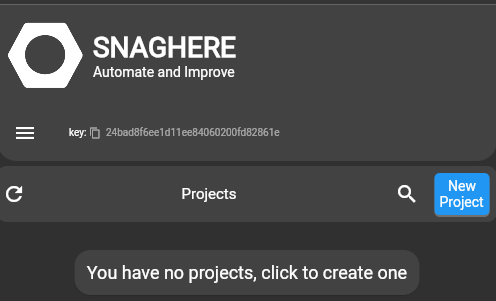
    مشروع جديد في snaghere

  3. قم بإنشاء قائمة عيوب جديدة بالنقر على زر "قائمة جديدة".
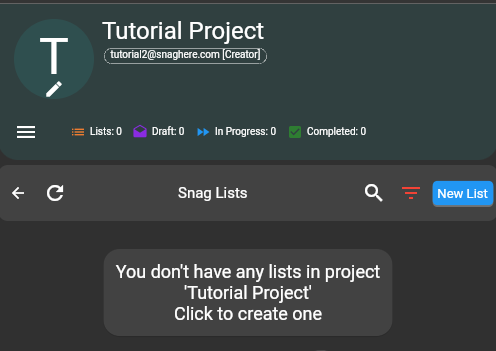
    قائمة عيوب جديدة في snaghere

    1. يجب عليك اختيار شركة للقائمة. إذا لم تكن شركتك مدرجة، يمكنك إنشاء شركة جديدة بالنقر على زر "شركة جديدة".
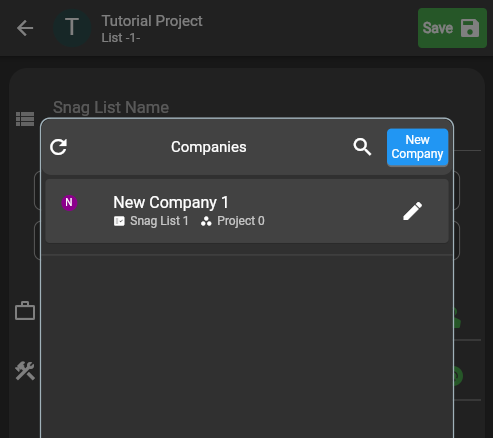
      شركة جديدة في snaghere

  4. قم بإنشاء عيب جديد بالنقر على زر "عيب جديد".
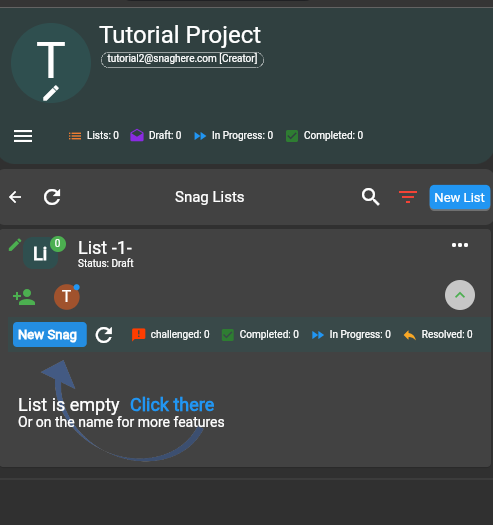
    عيب جديد في snaghere

انتهيت!

Hugo Fernandez's photo
Hugo Fernandez
@TransitTechHugo
Sep 11, 2025
0
47
1.12k+
719

Related Checklists


3D Printed Concrete Completed Wall Inspection Checklist
✅ 13 items
Use once for the completed wall or segment at the specified post-print inspection stage. This is not a substitute for later laboratory results or final project acceptance. Verify the approved drawings, qualified print system and project ITP. Record actual dimensions and evidence in the inspection record and route deviations through the project disposition process. For the complete before/during/after inspection guidance and the other visit-specific checklists, read the Quollnet inspection guide: https://quollnet.com/article/3d-printed-concrete-inspection-checklist
3D Concrete Printing Pre-Print Readiness Inspection Checklist
✅ 15 items
Use this checklist for one pre-print site visit covering a defined wall or print segment. Check each requirement against the current approved construction documents, qualified printing procedure and ITP; record measured values and evidence in the inspection entry as needed. Any failed critical item or outstanding hold point must be resolved before printing starts. For the complete before/during/after inspection guidance and the other visit-specific checklists, read the Quollnet inspection guide: https://quollnet.com/article/3d-printed-concrete-inspection-checklist
3D Printed Concrete Reinforcement and Embedded Services Inspection Checklist
✅ 13 items
Complete at a defined hold or witness visit before specified reinforcement, anchors, sleeves, boxes or other critical embedded items become concealed by printing, grouting or closing the wall. Inspect only the elements relevant to this visit and mark genuinely inapplicable checks N/A. Do not allow concealment where required engineering inspection or release is outstanding. For the complete before/during/after inspection guidance and the other visit-specific checklists, read the Quollnet inspection guide: https://quollnet.com/article/3d-printed-concrete-inspection-checklist
3D Concrete Printing Interruption and Restart Inspection Checklist
✅ 12 items
Use for one stoppage/restart event affecting a defined wall segment or layer. Record stop and restart times, location and cause in the event record. Assess the actual interruption duration and interface condition against the approved qualified restart procedure; never assume that roughening, wetting, or bonding agent alone makes a restart acceptable. Obtain the specified technical hold-point release before resumption. For the complete before/during/after inspection guidance and the other visit-specific checklists, read the Quollnet inspection guide: https://quollnet.com/article/3d-printed-concrete-inspection-checklist
3D Concrete Printing During-Print Quality Inspection Checklist
✅ 13 items
Complete this checklist for one defined observation visit during active printing of a wall or segment. Repeat the checklist for later visits. Record location/layer, measurements and process context in the inspection record; compare with the approved model, qualified printing parameters and project ITP. Stop or escalate when continued printing could conceal a critical defect or create instability. For the complete before/during/after inspection guidance and the other visit-specific checklists, read the Quollnet inspection guide: https://quollnet.com/article/3d-printed-concrete-inspection-checklist

Related Articles


Plumbing Defects
⏳ 1 min read
أكثر عيوب السباكة شيوعًا
استكشف أكثر مشكلات السباكة شيوعًا في مشاريع البناء وتعرّف على استراتيجيات فعّالة لمعالجتها وتقليل الأضرار والتكاليف.
Snag List Excel Format Sample
⏳ 1 min read
تنزيل نموذج إكسل لقائمة الملاحظات
نموذج قائمة الملاحظات بصيغة إكسل جاهز للتنزيل والاستخدام، مع مثال مُنشأ عبر تطبيق snaghere ورمز QR لكل ملاحظة.
First Aid Kit Maintenance Checklist
⏳ 4 min read
قائمة التحقق الأسبوعية لصيانة حقيبة الإسعافات الأولية (تنزيل Pdf وword وexcel وصورة)
حمّل قائمة تحقق أسبوعية مجانية لصيانة حقيبة الإسعافات الأولية بصيغ PDF وWord وExcel وصورة لضمان السلامة والامتثال في مكان العمل.
Snaghere Snaglist Software
⏳ 2 min read
حسّن عملية تسليم مشروعك مع تطبيق تتبّع قائمة الملاحظات
تطبيق Snaghere منصة تعاونية قوية لأتمتة قائمة الملاحظات وضمان تسليم المشاريع بكفاءة، مع تحسين ضبط الجودة ونتائج المشروع.
How To Use Qchecklists
⏳ 14 min read
كيفية استخدام Qchecklists: إنشاء القوالب، تشغيل عمليات التفتيش، إضافة الأدلة، التعاون، وتصدير التقارير
تعرّف على كيفية استخدام QChecklists لإنشاء قوالب قوائم التحقق، وبدء عمليات تشغيل مباشرة لقوائم التحقق، وإضافة التعليقات والمرفقات، والتعاون مع أعضاء الفريق، وتنظيم عمليات التشغيل ضمن مجموعات، وتصدير تقارير PDF أو Excel مع التحقق من الأصالة عبر رمز QR.