Pile dossier handover: QA documentation checklist
Definition: Compile pile dossier for handover with a structured, QA-focused checklist for contractors, consultants, and clients, covering records, tests, calibrations, as-builts, and NCR closures for compliant project completion.
- Ensure complete pile documentation for client acceptance and audit readiness.
- Prove performance with verified tests, calibrated instruments, and signed approvals.
- Deliver precise as-builts and NCR closures, aligned with project specifications.
- Interactive, commentable, export-ready checklist secured with a shareable QR code.
Compile pile dossier for handover is your structured process for organizing and validating all pile-related documentation prior to client acceptance. This piling documentation checklist focuses on the pile QA dossier, ensuring verifiable records for installation, testing, calibrations, and as-built deliverables while explicitly excluding general foundation records such as pile caps or ground beams. By curating only pile-specific evidence—installation logs, static and dynamic load test reports, integrity test summaries, instrument calibration certificates, and NCR closures—you reduce disputes, avoid rework, and accelerate taking-over. The outcome is a clean, traceable package that demonstrates compliance per approved project specifications and authority requirements, with consistent file naming, signatures, and revision control. Practical acceptance cues, SI-based tolerances, and geo-referenced evidence help teams close gaps quickly and defend quality under audit. Use this interactive checklist to assign actions, capture photo and file attachments, add comments, and track digital sign-offs. Start ticking items, comment where needed, and export the dossier as PDF/Excel with an embedded QR code.
- Focuses on pile-only documentation—installation records, test reports, calibration certificates, as-built coordinates, and NCR closures—while excluding general foundation records like pile caps. Keeps the package lean, auditable, and aligned with project specifications, so reviewers can verify traceability in minutes instead of trawling through unrelated files.
- Guides teams to gather calibrated test evidence: static load tests, PDA results, integrity testing, and laboratory strengths, each with accreditation, sample IDs, and signatures. Embeds practical acceptance tolerances in SI units, ensuring evidence is measurable, repeatable, and defensible during client reviews or authority inspections.
- Interactive online checklist with tick, comment, and export features secured by QR code.
- Streamlines final delivery with a structured index, consistent file naming, geo-tagged photos, and e-signatures. Produces bookmarked PDFs and linked registers for efficient navigation, enabling quick close-out, fewer clarifications, and a dossier that withstands technical scrutiny during handover and post-completion audits.
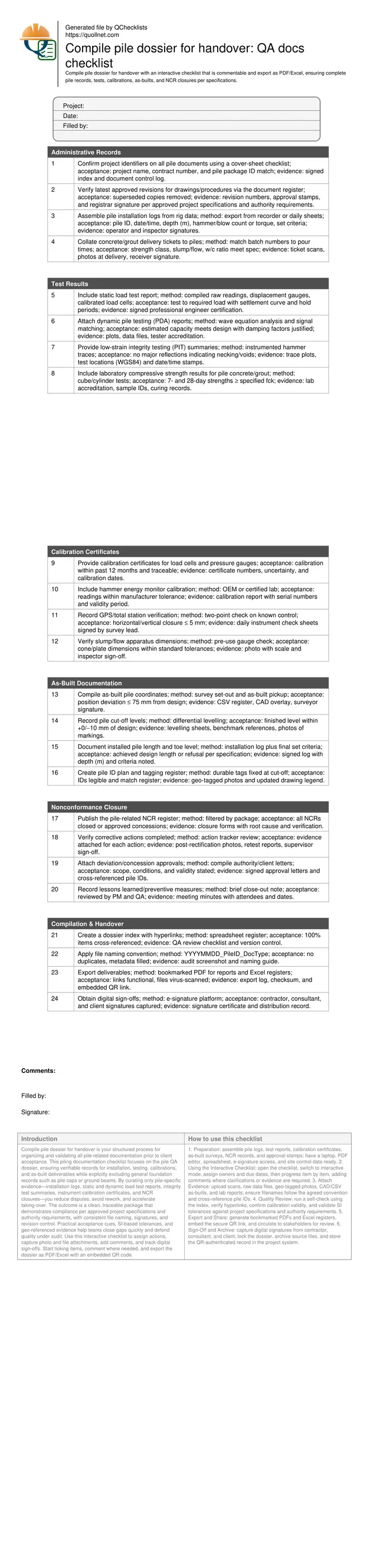
Administrative Records
Test Results
Calibration Certificates
As-Built Documentation
Nonconformance Closure
Compilation & Handover
Scope, boundaries, and acceptance cues
This checklist targets only pile-related documentation for handover, leaving out broader foundation records such as pile caps, ground beams, or substructure concrete pours. Concentrate on evidence that proves each pile was installed, tested, and documented per approved project specifications and authority requirements. Administrative records anchor traceability: installation logs, concrete/grout tickets, and approved procedures. Acceptance cues include revision-controlled documents, signed logs, and batch-to-pile traceability. For example, if a pile failed to reach design criteria on the initial drive, the dossier should contain the re-drive log, updated test evidence, and an NCR closure that references the specific pile ID. Keep measurements in SI units and show coordinates and elevations against known control points. A clean index, consistent file naming, and hyperlinks enable reviewers to verify compliance quickly, reducing clarifications and resubmissions. Avoid mixing unrelated foundation files; this keeps the dossier lean and auditable, protecting handover dates and minimizing disputes.
- Limit content strictly to pile documentation.
- Use SI units in all measurements and tolerances.
- Maintain signed logs and revision-controlled documents.
- Link batches, piles, and tests with clear traceability.
- Provide a searchable index with working hyperlinks.
Testing evidence and calibration traceability
Testing proves performance; calibration proves credibility. Include static load tests with raw readings, time-settlement plots, and calibrated load cells. Add dynamic (PDA) reports with signal matching, and low-strain integrity testing outputs that flag potential defects. Laboratory strength reports must list accreditation, sample IDs, mix class, and curing conditions. Instruments and test rigs require valid calibration certificates with traceability and uncertainty; verify validity dates and serial numbers. Field survey equipment should demonstrate daily checks and acceptable closure errors. Example: if a pressure gauge was out of calibration during a load test, either provide a post-test validation confirming acceptable accuracy or retest. Without calibration traceability, test results may be rejected, delaying handover. Ensure all test reports carry signatures from competent personnel and are referenced to the correct pile IDs and test locations.
- Attach raw data, plots, and signed summaries.
- Check calibration dates and serial numbers.
- Show survey closures within acceptable limits.
- Reference every test to exact pile IDs.
- Include lab accreditation and sample traceability.
As-builts, NCR closure, and final compilation
Accurate as-builts confirm that piles were installed at the correct locations, lengths, and levels. Provide coordinates referenced to project control, toe levels or achieved set criteria, and cut-off levels within stated tolerances. Use geo-tagged photos and a tagging register to align field markings with documents. Nonconformances must be transparently closed: register entries, root-cause analysis, corrective actions, and verification tests. Deviation approvals should explicitly cite pile IDs and conditions. For final compilation, build a navigable index, apply consistent naming, and export bookmarked PDFs with linked registers. Secure digital signatures from contractor, consultant, and client. Archive the source files and maintain a checksum or QR-secured link to prevent version confusion. This disciplined approach reduces ambiguity, speeds acceptance, and preserves a defensible record for audits and claims.
- Provide coordinates, levels, and tagging photos.
- Close NCRs with evidence and approvals.
- Export bookmarked PDFs and linked registers.
- Capture digital signatures from all parties.
- Archive source files with checksum or QR link.
How to prepare and hand over the pile dossier
- Preparation: assemble pile logs, test reports, calibration certificates, as-built surveys, NCR records, and approval stamps; have a laptop, PDF editor, spreadsheet, e-signature access, and site control data ready.
- Using the Interactive Checklist: open the checklist, switch to interactive mode, assign owners and due dates, then progress item by item, adding comments where clarifications or evidence are required.
- Attach Evidence: upload scans, raw data files, geo-tagged photos, CAD/CSV as-builts, and lab reports; ensure filenames follow the agreed convention and cross-reference pile IDs.
- Quality Review: run a self-check using the index, verify hyperlinks, confirm calibration validity, and validate SI tolerances against project specifications and authority requirements.
- Export and Share: generate bookmarked PDFs and Excel registers, embed the secure QR link, and circulate to stakeholders for review.
- Sign-Off and Archive: capture digital signatures from contractor, consultant, and client; lock the dossier, archive source files, and store the QR-authenticated record in the project system.
Call to Action
- Start Checklist Tick off tasks, leave comments on items or the whole form, and export your completed report to PDF or Excel—with a built-in QR code for authenticity.
- Download Excel - Pile Dossier Handover Checklist
- Download PDF - Pile Dossier Handover Checklist
- View Image - Pile Dossier Handover Checklist
Cite & Embed
“Pile Dossier Handover Checklist by Quollnet”
with a link to
this source page.

FAQ
Question: What belongs in the pile dossier, and what is excluded?
Question: How do I verify calibration validity for test instruments?
Question: What if a pile test failed or an NCR is still open?
Question: How precise should as-built pile coordinates and levels be?
Related Articles
Broader reading and guidance connected to this checklist topic.


Improve Your Project Handover Process With Snag List Tracking App


Open Ncrs At Taking-over / Dlp: What Happens At Handover And How To Escalate

Related Checklists
Keep the workflow moving with nearby templates chosen from similar checklist content.