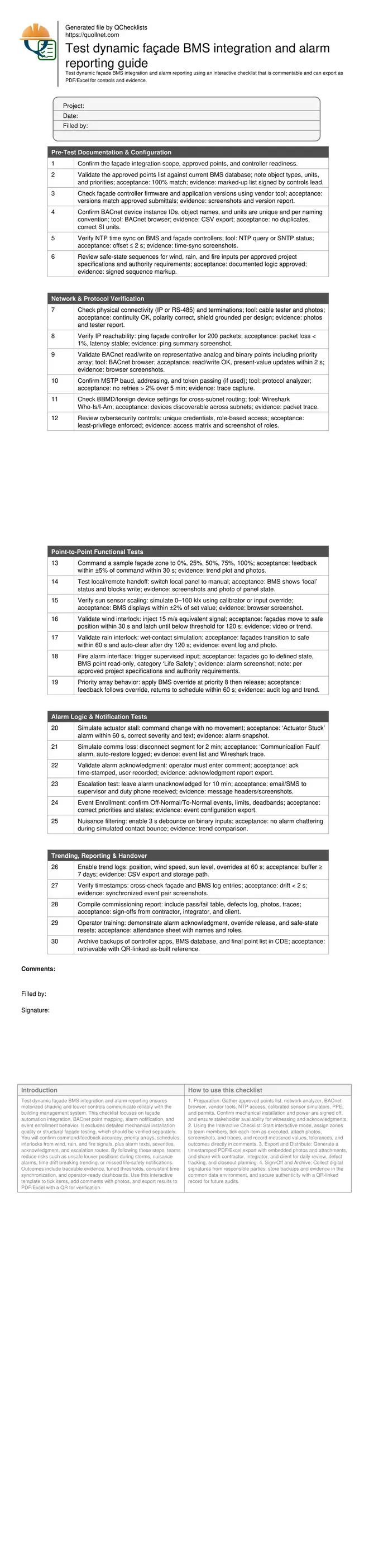
Test Dynamic Façade BMS Integration and Alarm Reporting
Definition: Test dynamic façade BMS integration and alarm reporting for commissioning teams verifying BACnet points, interlocks, and notifications, ensuring safe, compliant, and documented performance before occupancy and ongoing operations.
- Verify BACnet point mapping, priorities, units, and timestamps end-to-end
- Prove wind, rain, and fire interlocks transition façades to safe states
- Validate alarm texts, severities, escalation, and operator acknowledgment flow
- Interactive, commentable, export-ready checklist secured by QR code
Test dynamic façade BMS integration and alarm reporting ensures motorized shading and louver controls communicate reliably with the building management system. This checklist focuses on façade automation integration, BACnet point mapping, alarm notification, and event enrollment behavior. It excludes detailed mechanical installation quality or structural façade testing, which should be verified separately. You will confirm command/feedback accuracy, priority arrays, schedules, interlocks from wind, rain, and fire signals, plus alarm texts, severities, acknowledgment, and escalation routes. By following these steps, teams reduce risks such as unsafe louver positions during storms, nuisance alarms, time drift breaking trending, or missed life-safety notifications. Outcomes include traceable evidence, tuned thresholds, consistent time synchronization, and operator-ready dashboards. Use this interactive template to tick items, add comments with photos, and export results to PDF/Excel with a QR for verification.
- De-risks handover by proving end-to-end BACnet communications, correct units, accurate command/feedback, and stable priority handling. Confirms safe-state logic for wind, rain, and fire inputs and documents acceptance evidence, including screenshots, network traces, and trends for future maintenance and audits.
- Builds reliable alarm reporting by validating event enrollment, severities, texts, acknowledgment requirements, and timed escalation to supervisors. Reduces nuisance through debouncing and deadbands, and ensures operators see clear alarm summaries, timestamps, and zone-level context for rapid response and root-cause analysis.
- Ensures data integrity with time synchronization under 2 s drift, 7-day minimum trend buffers, and CSV exports for analytics. Consolidates commissioning artifacts—approved points list, configuration backups, and sign-offs—within a common data environment linked to project as-builts.
- Interactive online checklist with tick, comment, and export features secured by QR code.
Pre-Test Documentation & Configuration
Network & Protocol Verification
Point-to-Point Functional Tests
Alarm Logic & Notification Tests
Trending, Reporting & Handover
Commissioning Boundaries and Prerequisites
This checklist targets dynamic façade devices—motorized shades, blinds, and louvers—integrated to a building management system via BACnet. It assumes mechanical installation, power, and structural verifications are complete and approved. The emphasis is on database accuracy, time synchronization, and correct interpretation of sequences of operation for safe-state transitions. Teams verify unique device instances, clear naming, SI units, and consistent priority arrays, ensuring commands and feedback align. Network health is proven with physical inspection, IP reachability, and, where applicable, MS/TP token stability. By resolving configuration drift, mismatched units, and duplicate addresses upfront, field time is minimized and nuisance defects are avoided. Acceptance hinges on documented evidence: screenshots, protocol traces, photos of panels, and signed markups. Life-safety interfaces, including fire alarm signals, are validated strictly per approved project specifications and authority requirements to avoid unsafe behavior and handover delays.
- Installation and power checks completed beforehand
- Unique IDs, names, and SI units confirmed
- Time synchronization offset within 2 seconds
- Physical and protocol connectivity verified
- Evidence captured and signed off
Functional Integration and Interlocks
Reliable façade automation depends on accurate command/feedback, robust interlocks, and orderly priorities. Representative zones are driven through 0–100% while verifying feedback within ±5% and response times under 30 s. Local/remote handoff must clearly block BMS writes to prevent conflicts. Environmental inputs are simulated: sun level scaling across 0–100 kilolux, wind speeds that enforce immediate safe positioning, and rain signals that initiate protective states with a sensible auto-clear delay to avoid chatter. Fire alarm integration is confirmed so façades move to the designated position, and BMS points become read-only where mandated. Priority arrays are exercised to ensure operator overrides do not persist, returning control to schedules gracefully. Each test captures trends and photographs for traceability, building a defensible commissioning record.
- Command to feedback within ±5 percent
- Wind and rain drive safe states promptly
- Fire inputs handled per approvals
- Overrides return to schedules cleanly
Alarm Reporting, Escalation, and Evidence
Alarms protect operations only when they are accurate, timely, and actionable. Event enrollment is checked for Off-Normal and To-Normal transitions, with deadbands and limits tuned to reduce noise. Clear alarm texts, severities, and categories help operators triage quickly. Acknowledgment must capture user, time, and comment, while escalation sends notifications to the right roles if alarms remain unaddressed. Communication loss, sensor faults, and actuator stalls are simulated to confirm consistent behavior and auto-recovery logs. Trend buffers and CSV exports secure the evidence required for analytics and warranty. Finally, an alarm summary dashboard presents counts by zone and priority with near-real-time refresh, ensuring issues are visible and auditable.
- Texts, severities, and categories standardized
- Acknowledgment requires time, user, comment
- Escalation reaches duty contacts reliably
- Deadbands and debounce reduce nuisance alarms
- Dashboard refresh within ten seconds
How to Use This Interactive Checklist
- Preparation: Gather approved points list, network analyzer, BACnet browser, vendor tools, NTP access, calibrated sensor simulators, PPE, and permits. Confirm mechanical installation and power are signed off, and ensure stakeholder availability for witnessing and acknowledgments.
- Using the Interactive Checklist: Start interactive mode, assign zones to team members, tick each item as executed, attach photos, screenshots, and traces, and record measured values, tolerances, and outcomes directly in comments.
- Export and Distribute: Generate a timestamped PDF/Excel export with embedded photos and attachments, and share with contractor, integrator, and client for daily review, defect tracking, and closeout planning.
- Sign-Off and Archive: Collect digital signatures from responsible parties, store backups and evidence in the common data environment, and secure authenticity with a QR-linked record for future audits.
Call to Action
- Start Checklist Tick off tasks, leave comments on items or the whole form, and export your completed report to PDF or Excel—with a built-in QR code for authenticity.
- Download Excel - Dynamic Façade BMS Integration & Alarm Testing
- Download PDF - Dynamic Façade BMS Integration & Alarm Testing
- View Image - Dynamic Façade BMS Integration & Alarm Testing
Cite & Embed
“Dynamic Façade BMS Integration & Alarm Testing by Quollnet”
with a link to
this source page.

FAQ
Question: What systems are in scope for dynamic façade BMS integration testing?
Question: How do we reduce nuisance alarms during façade operation?
Question: Which BACnet features are critical to verify for façade integration?
Question: How should evidence be recorded for commissioning and warranty?
Related Articles
Broader reading and guidance connected to this checklist topic.


Is It Important To Customize Your Qr Code And How To Do It?

Master Construction Project Cashflow With Cashflowpot
Related Checklists
Keep the workflow moving with nearby templates chosen from similar checklist content.