Review Façade Handover Deliverables, Warranties, and O&M in Design
Definition: Review façade handover deliverables, warranties, and O&M requirements in design equips design teams and owners to define, verify, and evidence complete façade closeout packages before procurement and construction mobilization.
- Clarify handover scope, file formats, and revision status early in design.
- Lock warranty obligations and maintenance conditions that match specifications.
- Define O&M content, asset data, and access strategy owners will use.
- Interactive, commentable checklist with export and QR code verification.
Review façade handover deliverables, warranties, and O&M requirements in design establishes exactly what the contractor and suppliers must submit for a clean, timely closeout. By defining façade handover documentation, warranty matrix expectations, and operations and maintenance (O&M) manual content during design development, you prevent scope gaps, data loss, and late-stage disputes. This design-stage checklist focuses on façade packages only—curtain wall, cladding, glazing, sealants, and interfaces—detailing deliverable registers, warranty terms and triggers, maintenance access strategy, and asset information requirements. It helps align the BIM execution plan, drawing standards, and approved project specifications and authority requirements so that final dossiers are complete, searchable, and owner-ready. Risks avoided include invalidated warranties due to incompatible cleaning agents, missing test certificates, and unusable file formats; outcomes delivered include traceable asset data, clear maintenance instructions, and unambiguous sign-off pathways. Use this interactive checklist to tick items, add comments, upload evidence, and export as PDF/Excel with a QR-secured record.
- Define the façade handover register, document formats, and revision status before tender to eliminate ambiguity, prevent rework, and streamline contract requirements. Capture evidence as you design acceptance criteria owners will enforce later.
- Create a warranty matrix that aligns component warranties, start dates, maintenance conditions, and transferability with approved project specifications and authority requirements, minimizing risk of voided coverage and post-occupancy disputes.
- Specify O&M manual content, access strategy drawings, and asset data fields owners actually need—cleaning methods, inspection frequencies, spares, and tagging—so maintenance teams can act immediately after handover.
- Interactive online checklist with tick, comment, and export features secured by QR code.
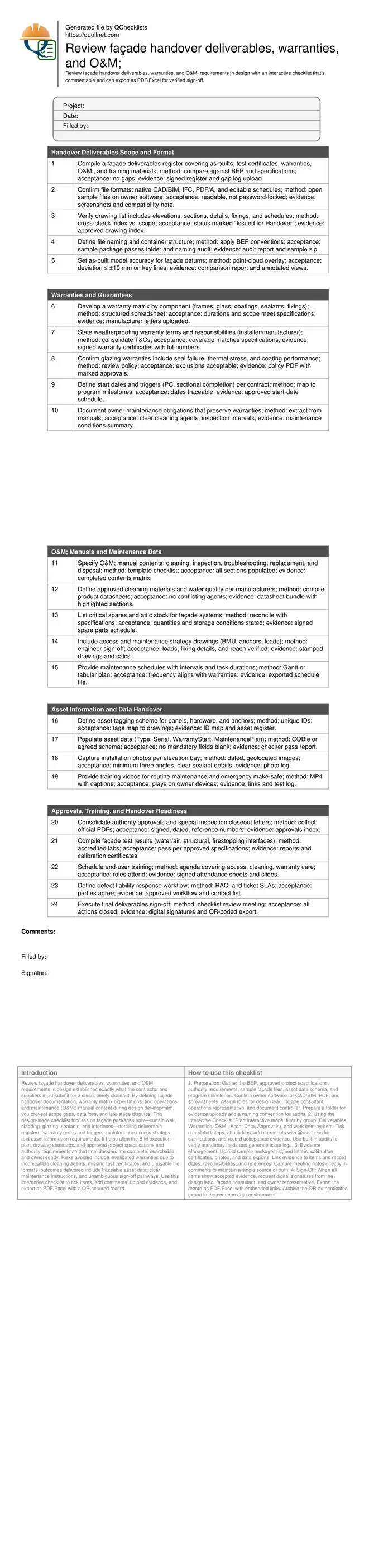
Handover Deliverables Scope and Format
Warranties and Guarantees
O&M Manuals and Maintenance Data
Asset Information and Data Handover
Approvals, Training, and Handover Readiness
Lock deliverables early to avoid closeout surprises
Defining façade handover deliverables in design prevents last‑minute scrambles for as‑builts, certificates, and owner‑usable files. Start with a register that lists drawing packages, models, test reports, warranties, O&M, and training media, then validate formats (native CAD/BIM, IFC, PDF/A) against the owner’s software stack. Agree file naming and container structure in the BEP so searches work the day the building opens. Set revision status, metadata, and as‑built accuracy expectations now to guide site surveys and model updates later. A typical pitfall is a beautiful façade model that fails an owner import because of locked PDFs or missing parameter fields; another is an index that omits bracket details critical for maintenance. The acceptance cues are practical: a signed, gap‑free register, a small sample package that passes a folder/naming audit, and an overlay tolerance for key façade datums the field team can achieve with standard scanning workflows.
- Publish a gap-free deliverables register.
- Test a real sample through the owner’s software.
- Standardize file naming and folders in the BEP.
- Define as-built accuracy targets that field teams can meet.
- Require clear revision status on every file.
Design warranties that stand up in real use
Warranties fail most often due to unclear scope, ambiguous start dates, or maintenance conditions nobody can meet. In design, build a warranty matrix by façade component with coverage, responsibilities, and exclusions mapped to the specifications. Nail down when clocks start—practical completion or sectional completion—and how replacements affect durations. Tie maintenance obligations directly to the O&M content: compatible cleaning agents, inspection intervals, and access methods. Confirm transferability to the owner and any subsequent buyer. A real‑world save: specifying acceptable cleaners for anodized finishes prevented early staining and preserved coverage. Acceptance cues include signed manufacturer letters, traceable lot numbers for critical sealants, and a start‑date schedule aligned with the program. Ensure the operations team can actually comply with every condition you list.
- Matrix coverage by component and party.
- Fix start dates and replacement rules early.
- Link maintenance conditions to O&M tasks.
- Confirm transferability without hidden clauses.
- Collect signed letters with traceable lots.
Make O&M and asset data actionable on day one
Owners need more than binders—they need clear tasks, access methods, and searchable asset data. Specify O&M manuals with step‑by‑step cleaning, inspection frequencies, troubleshooting, and replacement procedures. Engineer a maintenance access strategy that shows BMU reach, anchor locations, loads, and fixings, ensuring safe, repeatable operations. Demand asset tagging that maps to drawings and a data schema (e.g., COBie or agreed fields) with warranty dates and maintenance plans populated—no blanks for mandatory fields. Include photos of installed conditions, sealant terminations, and firestop interfaces for future reference. Provide short training videos covering routine care and emergency make‑safe. Acceptance looks like: populated data exports that pass a checker, stamped access drawings, a spare parts list that matches specifications, and media that works on standard owner devices.
- Provide engineered access strategy and loads.
- Populate mandatory asset fields with dates.
- Map tags to drawings and locations.
- Deliver concise training media with captions.
- Include clear photos of critical interfaces.
How to use this interactive design-stage checklist
- Preparation: Gather the BEP, approved project specifications, authority requirements, sample façade files, asset data schema, and program milestones. Confirm owner software for CAD/BIM, PDF, and spreadsheets. Assign roles for design lead, façade consultant, operations representative, and document controller. Prepare a folder for evidence uploads and a naming convention for audits.
- Using the Interactive Checklist: Start interactive mode, filter by group (Deliverables, Warranties, O&M, Asset Data, Approvals), and work item-by-item. Tick completed steps, attach files, add comments with @mentions for clarifications, and record acceptance evidence. Use built-in audits to verify mandatory fields and generate issue logs.
- Evidence Management: Upload sample packages, signed letters, calibration certificates, photos, and data exports. Link evidence to items and record dates, responsibilities, and references. Capture meeting notes directly in comments to maintain a single source of truth.
- Sign-Off: When all items show accepted evidence, request digital signatures from the design lead, façade consultant, and owner representative. Export the record as PDF/Excel with embedded links. Archive the QR-authenticated export in the common data environment.
Call to Action
- Start Checklist Tick off tasks, leave comments on items or the whole form, and export your completed report to PDF or Excel—with a built-in QR code for authenticity.
- Download Excel - Façade Handover Deliverables & Warranty Review (Design)
- Download PDF - Façade Handover Deliverables & Warranty Review (Design)
- View Image - Façade Handover Deliverables & Warranty Review (Design)
Cite & Embed
“Façade Handover Deliverables & Warranty Review (Design) by Quollnet”
with a link to
this source page.

FAQ
Question: When should façade handover deliverables and warranties be fixed in design?
Question: What makes an O&M manual acceptable for façade systems?
Question: How do we avoid voiding façade warranties after handover?
Question: What asset data fields are essential for façade components?
Related Articles
Broader reading and guidance connected to this checklist topic.



Open Ncrs At Taking-over / Dlp: What Happens At Handover And How To Escalate

Improve Your Project Handover Process With Snag List Tracking App
Related Checklists
Keep the workflow moving with nearby templates chosen from similar checklist content.