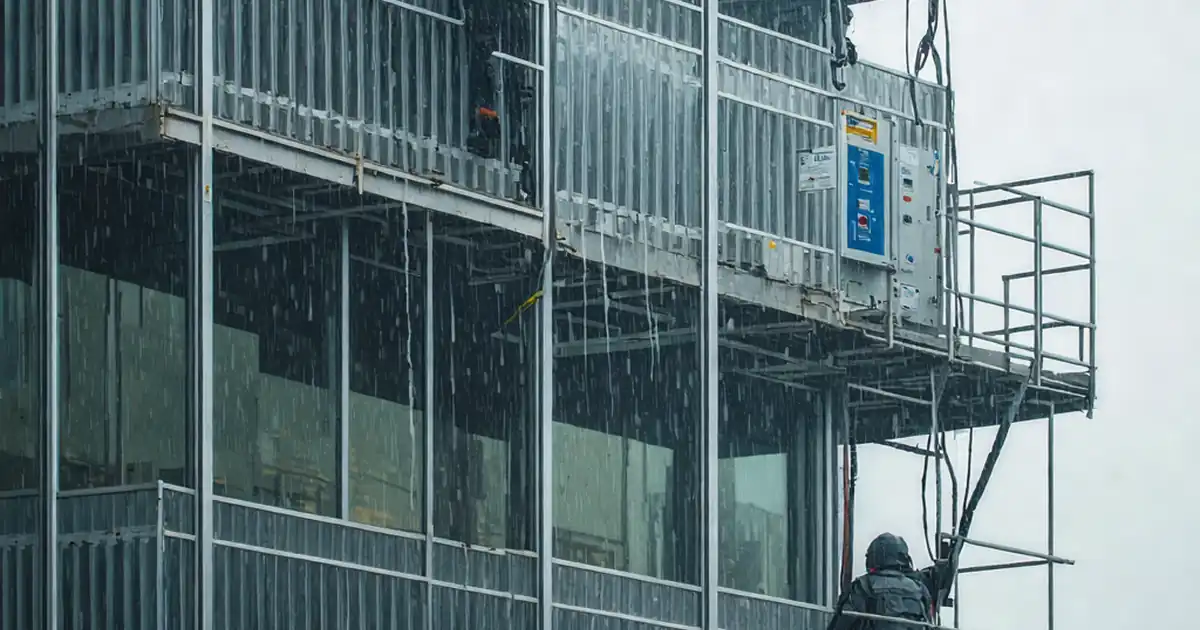
Inspect dynamic façade sensors for sun, wind and rain
Definition: Inspect dynamic façade sensors for sun, wind, and rain response to guide commissioning and maintenance teams, confirming correct installation, calibration, environmental exposure, and BMS integration for dependable weather-driven façade control.
- Verify mounting, orientation, and exposure for accurate environmental sensing.
- Calibrate outputs and validate thresholds against traceable reference instruments.
- Test BMS points, alarms, and fail-safes to protect façades and occupants.
- Interactive, commentable checklist with export and QR code for authentication.
Inspect dynamic façade sensors for sun, wind, and rain response is a focused checklist for commissioning agents, facility managers, and façade specialists. It targets solar irradiance sensors, anemometers, and rain detectors that drive dynamic shading, operable façades, and weather protection logic. By systematically checking mounting orientation, exposure, wiring, signal ranges, calibration, and BMS integration, you minimize risks such as glass or cladding damage from high winds, uncontrolled glare and heat gain, and nuisance rain responses. The scope covers field inspection and functional testing of weather sensors and their mapped points within the building management system; actuator sequencing and mechanical adjustment of shades are excluded. Practical methods—reference pyranometer comparisons, handheld anemometry, and controlled spray tests—verify accuracy, stability, and setpoints per approved project specifications and authority requirements. Use this interactive checklist to tick tasks, add comments, attach photos and logs, and export results to PDF/Excel with a secure QR code for records.
- Comprehensively verify sun, wind, and rain sensors powering dynamic façades, ensuring correct mounting, exposure, electrical integrity, and calibration so façade controls react predictably, reduce energy waste, and protect the building envelope during variable weather.
- Field-simulate solar irradiance, wind speed/direction, and precipitation using traceable instruments to validate BMS thresholds, alarms, and fail-safe behaviors. Trend logs confirm stability, hysteresis, and response times before releasing controls from maintenance mode.
- Interactive online checklist with tick, comment, and export features secured by QR code.
- Close out with complete evidence: photos of installations, measured values, trend graphs, calibration certificates, BMS screenshots, and digital sign-offs—creating a defensible record for commissioning, handover, and ongoing maintenance verification.
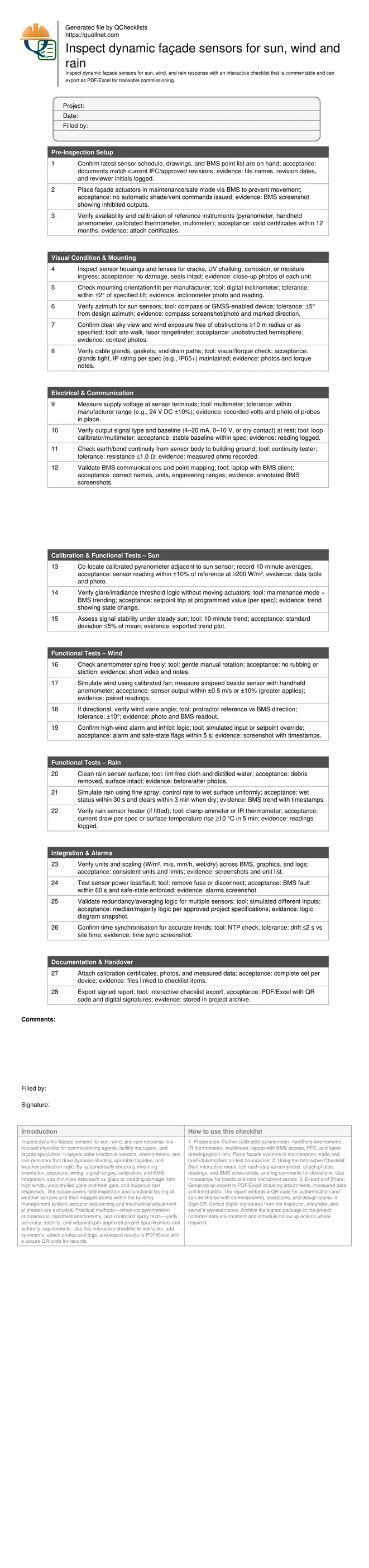
Pre-Inspection Setup
Visual Condition & Mounting
Electrical & Communication
Calibration & Functional Tests – Sun
Functional Tests – Wind
Functional Tests – Rain
Integration & Alarms
Documentation & Handover
Why dynamic façade sensor inspections matter
Dynamic façades depend on accurate environmental inputs to deploy shading, close vents, or protect cladding during adverse weather. Small errors in sun, wind, or rain sensing can trigger nuisance movements, occupant complaints, or even damage during storms. This checklist concentrates on the sensors and their BMS points: mounting, exposure, wiring, calibration, stability, thresholds, and alarms. Actuator mechanics and shading hardware are intentionally excluded to keep scope precise. We emphasise practical acceptance cues—orientation within ±2°, irradiance agreement within ±10%, wind speed within ±0.5 m/s or 10%, and rain response times—so teams can approve decisively. Real-world examples include preventing louvre flutter by validating high-wind inhibits, or reducing glare by verifying solar setpoints before occupants arrive. By trending readings and documenting evidence, you create a defensible record for commissioning, seasonal re-checks, and warranty support.
- Focus strictly on environmental sensors and BMS points.
- Use traceable instruments to confirm accuracy onsite.
- Record photos, readings, and timestamps for each step.
- Rely on clear acceptance tolerances to approve or reject.
Methods, tools, and acceptance cues in the field
Field conditions rarely align perfectly, so the method prioritises co-location and short trending to filter noise. For sun, place a calibrated pyranometer beside the façade irradiance sensor and compare 10-minute averages. For wind, a portable fan and certified handheld anemometer create repeatable speeds at the sensor’s elevation. For rain, a fine, uniform spray tests detection, clearing, and heater function. Electrical integrity is verified with multimeter checks, grounding continuity, and point scaling audits in the BMS. Acceptance criteria reference manufacturer datasheets and per approved project specifications and authority requirements, with practical thresholds to drive decisions. Capturing screenshots, photos, and logs ensures traceability when reconciling discrepancies later with designers or integrators.
- Trend steady conditions to assess stability and hysteresis.
- Confirm units and scaling before judging readings.
- Hold façades in safe mode to avoid unwanted motion.
- Test alarms and fail-safes using controlled simulations.
- Document every reading with source and uncertainty.
Integration, alarms, and defensible documentation
Accurate sensing alone is insufficient; the BMS must map points correctly, apply the right logic, and time-stamp events consistently. Verify naming, units, engineering ranges, and setpoints on graphics and trend logs. Test failure modes by removing power or communication and confirm alarms and safe-states appear within seconds. For sites with multiple rooftop sensors, validate averaging or median selection to minimise local turbulence effects. Time synchronisation across controllers and servers is essential for comparing events. Close with a complete evidence pack—calibration certificates, co-located measurements, photos, and signed exports—so any stakeholder can retrace decisions months later without ambiguity.
- Map points and units consistently across the BMS.
- Prove fail-safe behaviour with timestamped trends.
- Validate redundancy logic for multi-sensor strategies.
- Ensure NTP time sync for credible records.
How to use this interactive façade sensor inspection checklist
- Preparation: Gather calibrated pyranometer, handheld anemometer, IR thermometer, multimeter, laptop with BMS access, PPE, and latest drawings/point lists. Place façade systems in maintenance mode and brief stakeholders on test boundaries.
- Using the Interactive Checklist: Start interactive mode, tick each step as completed, attach photos, readings, and BMS screenshots, and log comments for deviations. Use timestamps for trends and note instrument serials.
- Export and Share: Generate an export to PDF/Excel including attachments, measured data, and trend plots. The report embeds a QR code for authentication and can be shared with commissioning, operations, and design teams.
- Sign-Off: Collect digital signatures from the inspector, integrator, and owner’s representative. Archive the signed package in the project common data environment and schedule follow-up actions where required.
Call to Action
- Start Checklist Tick off tasks, leave comments on items or the whole form, and export your completed report to PDF or Excel—with a built-in QR code for authenticity.
- Download Excel - Dynamic Façade Sensor Inspection – Sun, Wind, Rain
- Download PDF - Dynamic Façade Sensor Inspection – Sun, Wind, Rain
- View Image - Dynamic Façade Sensor Inspection – Sun, Wind, Rain
Cite & Embed
“Dynamic Façade Sensor Inspection – Sun, Wind, Rain by Quollnet”
with a link to
this source page.
FAQ
Question: How often should sun, wind, and rain façade sensors be inspected and calibrated?
Question: What tolerances are acceptable for field verification of these sensors?
Question: How can we test high-wind inhibits without risking façade damage?
Question: What evidence should be captured to support commissioning sign-off?
Related Articles
Broader reading and guidance connected to this checklist topic.



Related Checklists
Keep the workflow moving with nearby templates chosen from similar checklist content.