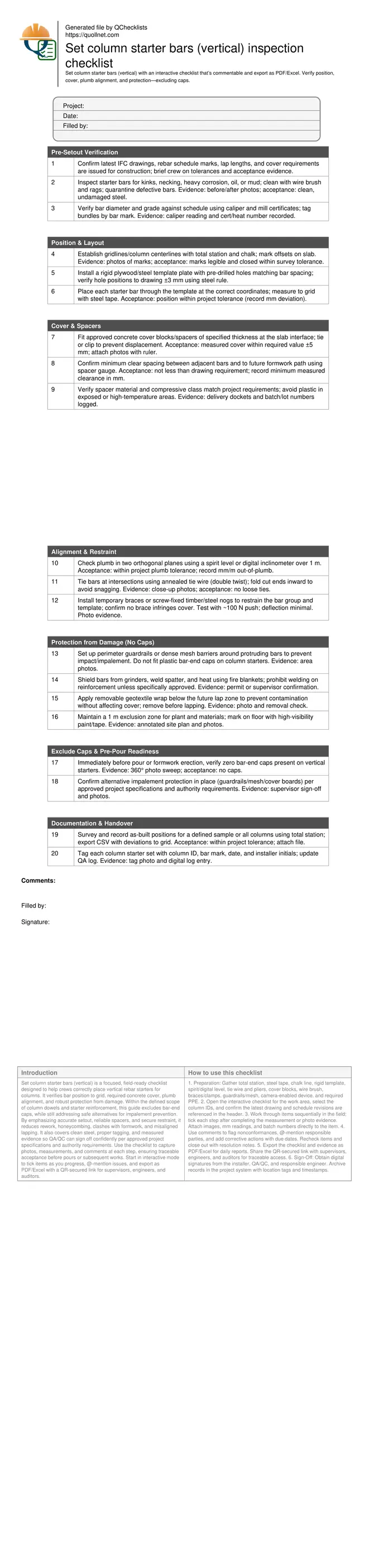
Set column starter bars (vertical) inspection checklist
Definition: Set column starter bars (vertical) verification checklist for site engineers and foremen, focusing on position, concrete cover, plumb alignment, and protection from damage—while explicitly excluding bar-end caps before concreting.
- Confirm bar position to gridlines with templates and total station.
- Achieve specified concrete cover using approved spacers, documented with photos.
- Maintain plumb alignment and restraint to prevent movement during pours.
- Interactive, commentable checklist with export and QR code traceability.
Set column starter bars (vertical) is a focused, field-ready checklist designed to help crews correctly place vertical rebar starters for columns. It verifies bar position to grid, required concrete cover, plumb alignment, and robust protection from damage. Within the defined scope of column dowels and starter reinforcement, this guide excludes bar-end caps, while still addressing safe alternatives for impalement prevention. By emphasizing accurate setout, reliable spacers, and secure restraint, it reduces rework, honeycombing, clashes with formwork, and misaligned lapping. It also covers clean steel, proper tagging, and measured evidence so QA/QC can sign off confidently per approved project specifications and authority requirements. Use the checklist to capture photos, measurements, and comments at each step, ensuring traceable acceptance before pours or subsequent works. Start in interactive mode to tick items as you progress, @-mention issues, and export as PDF/Excel with a QR-secured link for supervisors, engineers, and auditors.
- This checklist drives precise positioning of vertical column starter bars against layout lines, validated with templates, tapes, and total station points. It ensures clean steel, correct identification, and documented evidence with photos, measurements, and signatures, reducing rework and ensuring the next trade can proceed without delays.
- Concrete cover is controlled with compliant spacers and on-site measurements. The workflow requires records at multiple points per column, producing a clear audit trail of cover verification and bar clearances before any formwork or pour activities, aligning with approved project specifications and authority requirements.
- Alignment and restraint steps keep bars plumb and stable during foot traffic and pours, while protecting against mechanical damage and welding heat. The procedure strictly excludes bar-end caps on column starters and mandates alternative guarding solutions to maintain safety without compromising placement or bond.
- Interactive online checklist with tick, comment, and export features secured by QR code.
Pre-Setout Verification
Position & Layout
Cover & Spacers
Alignment & Restraint
Protection from Damage (No Caps)
Exclude Caps & Pre-Pour Readiness
Documentation & Handover
Position and Concrete Cover: Getting the Fundamentals Right
Accurate position and reliable cover control determine whether column starter bars perform as designed. Start with a clean, surveyed layout: establish grid and column centerlines using a total station, then lock positions with a rigid template plate that mirrors drawing spacings. This prevents drift while tying and during foot traffic. For cover, use approved concrete spacers of the specified thickness, tied or clipped so they cannot flip or float. Measure cover at multiple points with a ruler or spacer gauge and document the values; acceptance is meeting the drawing requirement within a tight ±5 mm band. Maintain clear spacing between bars and future formwork, checking the template doesn’t steal cover at edges or corners. Keep steel clean—brush off mill scale flakes, remove oils, and reject kinked or necked bars. By combining template control, proper spacers, and measured evidence, crews avoid honeycombing, congestion, and misalignment that would later compromise lapping, column geometry, and inspection approvals.
- Fix a rigid template; verify hole spacing within ±3 mm.
- Use concrete spacers; measure cover within required ±5 mm.
- Survey to grid; record deviations in millimetres.
- Keep bars clean and defect-free; photo-document condition.
- Maintain clearances for future formwork movement.
Plumb Alignment and Restraint Without Compromising Safety
Plumb alignment ensures smooth column cage connection and consistent lap performance. Check each bar in two perpendicular planes with a spirit level or digital inclinometer over a set gauge length, recording deviation in mm or mm/m. Restrain the group using screw-fixed nogs, clamps, or braces so alignment survives moving form panels and concrete placement. Tie all intersections securely with annealed wire, folding cut ends inward to avoid snagging. Protect reinforcement from mechanical damage, weld spatter, and grinder sparks using fire blankets and controlled work zones. Critically, exclude plastic bar-end caps from vertical column starters; they can mask alignment, interfere with templates, and be mistakenly cast-in. Maintain safety using guardrails, mesh barriers, or cover boards that don’t alter bar geometry—implement per approved project specifications and authority requirements. This approach preserves both safety and placement accuracy, preventing last-minute rework and inspection failures.
- Check plumb in two planes; record measured deviation.
- Install braces that don’t infringe required cover.
- Secure double-twist ties; no loose or protruding ends.
- Exclude bar-end caps; use guardrails or mesh barriers.
- Shield bars from heat and mechanical impacts.
Evidence, Sign-Off, and Common Pitfalls to Avoid
Reliable records speed approvals and reduce disputes. Capture clear photos of grid marks, template plates, spacers with rulers, and plumb checks. Survey representative columns with a total station to validate cumulative position. Tag each location with the column ID and bar mark so later crews can verify laps instantly. Avoid common traps: spacers not tied (they flip), templates that steal cover at corners, braces pushing on bars, or caps left on starters before formwork or pouring. When in doubt, confirm acceptance tolerances per approved project specifications and authority requirements and record actual measurements in millimetres. Store all data with timestamps and user initials for auditability. These practices turn subjective checks into objective evidence, accelerate engineer sign-off, and keep downstream operations—formwork, cages, and pours—on schedule and within tolerance.
- Photograph measurements with a visible scale and ID tag.
- Survey as-built positions and export a deviation report.
- Record batch numbers for spacers and wire.
- Confirm tolerances with the site engineer when unclear.
- Remove all caps before pour; document zero-cap status.
How to Use This Checklist On Site
- Preparation: Gather total station, steel tape, chalk line, rigid template, spirit/digital level, tie wire and pliers, cover blocks, wire brush, braces/clamps, guardrails/mesh, camera-enabled device, and required PPE.
- Open the interactive checklist for the work area, select the column IDs, and confirm the latest drawing and schedule revisions are referenced in the header.
- Work through items sequentially in the field; tick each step after completing the measurement or photo evidence. Attach images, mm readings, and batch numbers directly to the item.
- Use comments to flag nonconformances, @-mention responsible parties, and add corrective actions with due dates. Recheck items and close out with resolution notes.
- Export the checklist and evidence as PDF/Excel for daily reports. Share the QR-secured link with supervisors, engineers, and auditors for traceable access.
- Sign-Off: Obtain digital signatures from the installer, QA/QC, and responsible engineer. Archive records in the project system with location tags and timestamps.
Call to Action
- Start Checklist Tick off tasks, leave comments on items or the whole form, and export your completed report to PDF or Excel—with a built-in QR code for authenticity.
- Download Excel - Column Starter Bars (Vertical) Setting
- Download PDF - Column Starter Bars (Vertical) Setting
- View Image - Column Starter Bars (Vertical) Setting
Cite & Embed
“Column Starter Bars (Vertical) Setting by Quollnet”
with a link to
this source page.
FAQ
Question: Why are bar-end caps excluded on vertical column starter bars, and how do we keep the site safe?
Question: How should I verify concrete cover on starter bars before the next operation?
Question: What is the best method to confirm plumb alignment of vertical starters?
Question: A starter bar was slightly bent by site traffic—can I straighten it?
Question: How do I protect starters from contamination or heat without using caps?
Related Articles
Broader reading and guidance connected to this checklist topic.


How To Specify Concrete Slump For Slabs, Beams, Columns And Walls

Related Checklists
Keep the workflow moving with nearby templates chosen from similar checklist content.